Scheduling · Bahamas

Bahamas employee scheduling. Fill the gap with context.

Review vacancies, compare qualified staff and assign coverage across your locations.

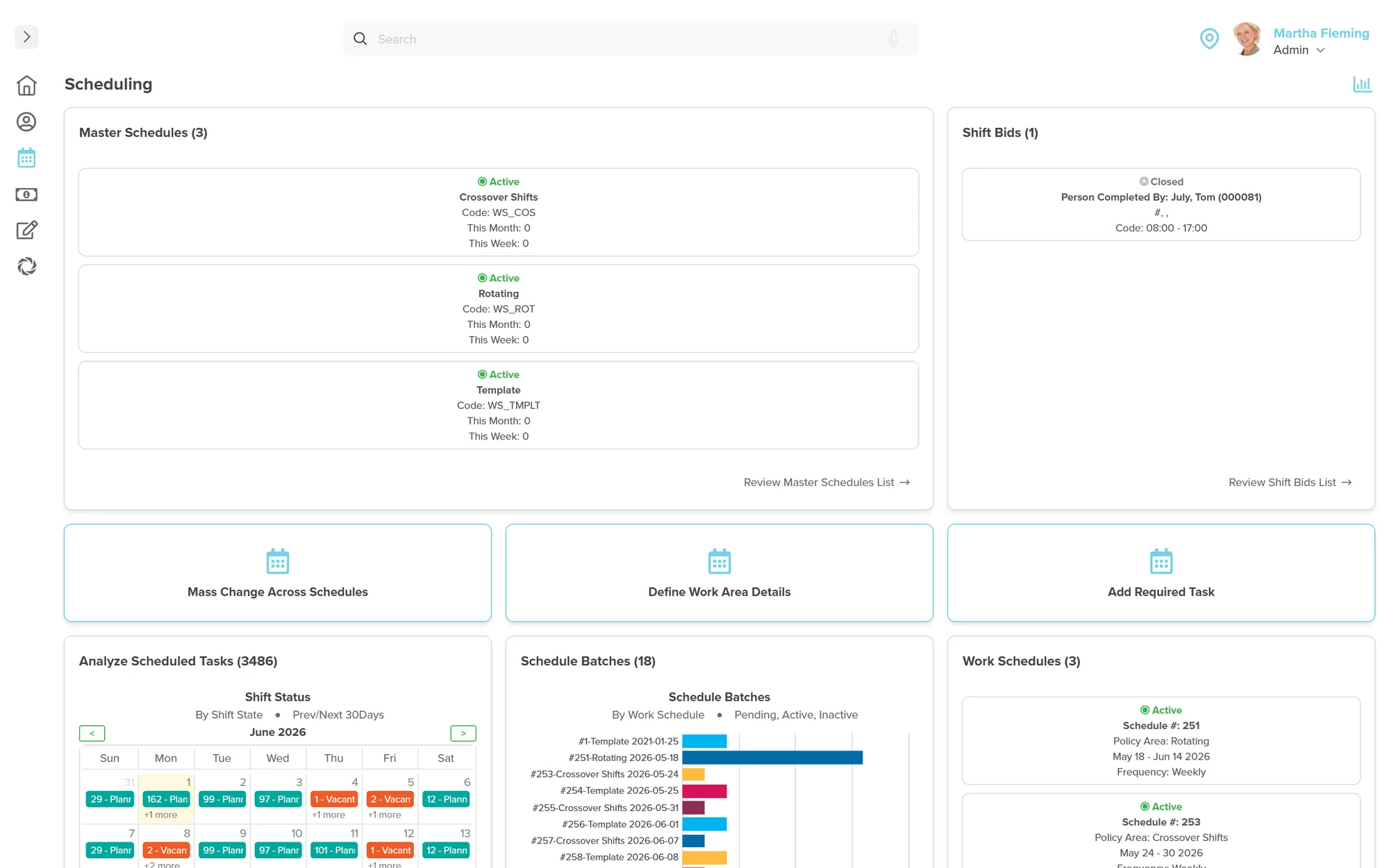
Workzoom Scheduling dashboard showing Master Schedules with active crossover, rotating and template shifts, a Shift Bids panel, an Analyze Scheduled Tasks calendar by shift status, a Schedule Batches bar chart, and Work Schedules panels.

Our clients

The teams that run their people on Workzoom.

See customer stories
Benefits

Why Scheduling?

Compare workers before filling a gap

Qualified Fill ranks workers against configured criteria such as certifications, preferences and current schedules. Managers review the context and assign coverage.

Keep sites and shift patterns together

Master schedules support multiple sites or managers. Use rotating or pattern schedules for repeating work and templates for staffing that changes week to week.

Follow approved hours into payroll

A planned shift is not proof of time worked. Managers correct and approve recorded time; approved hours feed the matching pay period when approved before cutoff.

How it works

How employee scheduling software bahamas runs in production.

VACANCY MANAGEMENT

Review the vacancy and compare qualified workers

Qualified Fill ranks workers using criteria your team configures, such as seniority, certifications, preferences and current schedules. Hard requirements can exclude a worker entirely.

Workers on leave or partly scheduled may remain lower in the list, so managers review the context before assigning.

  • Set the qualifications and ranking criteria your operation needs
  • Review schedule conflicts alongside the ranked candidates
  • Let a manager select and assign the replacement
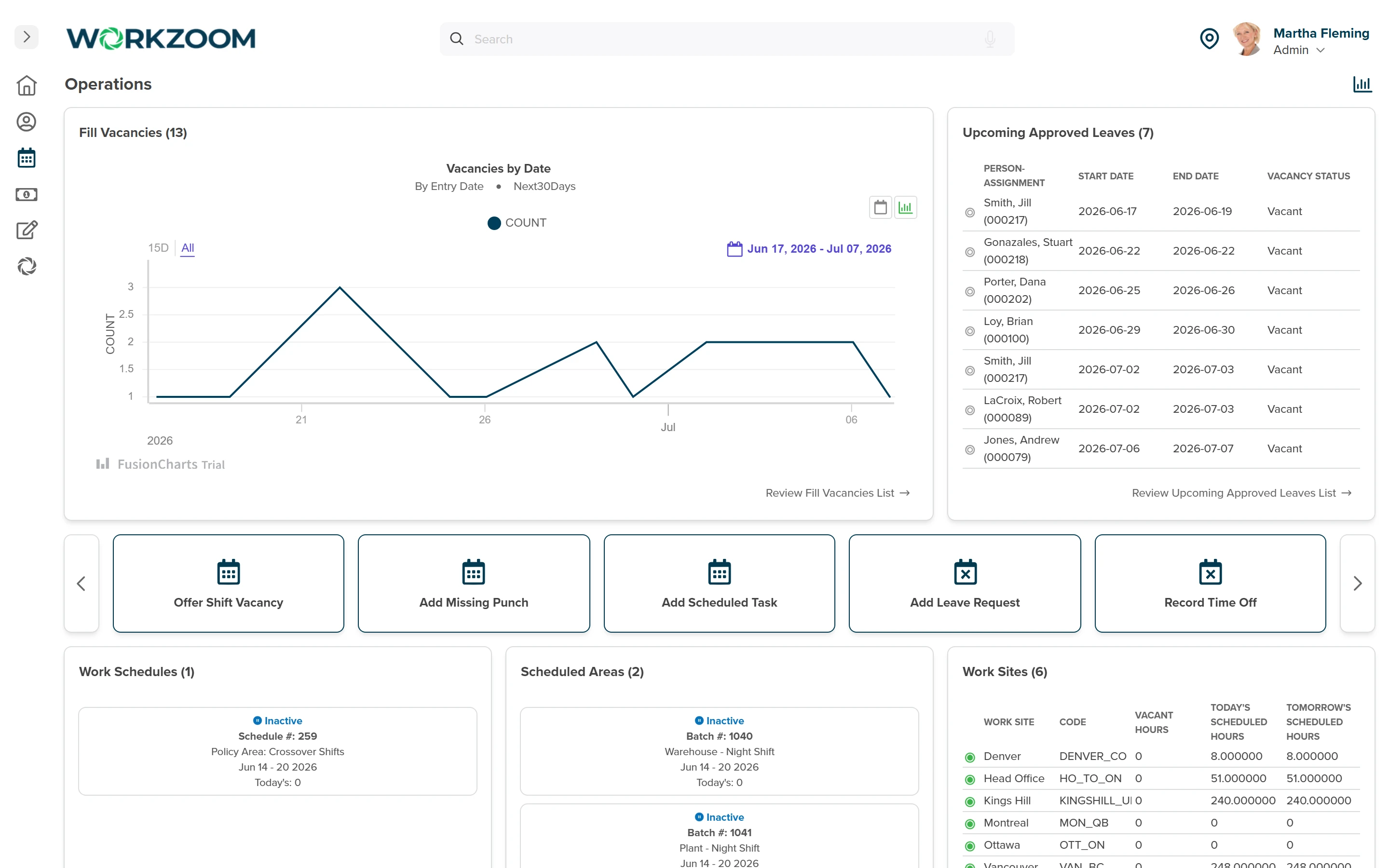
Workzoom Scheduling Operations dashboard showing Fill Vacancies by date, Upcoming Approved Leaves with vacancy status, quick actions to offer shift vacancies, and scheduled hours by work site
View full-size screenshot
SCHEDULE MODELS

Choose a schedule model that fits the work

Use rotating or pattern schedules for repeating shifts and templates for staffing that changes week to week.

Editing a generated schedule affects that period; changing a template can update future generated schedules and override their ad hoc edits.

  • Match repeating work to a rotating or pattern schedule
  • Use a template for staffing that changes week to week
  • Check which periods a template change will affect
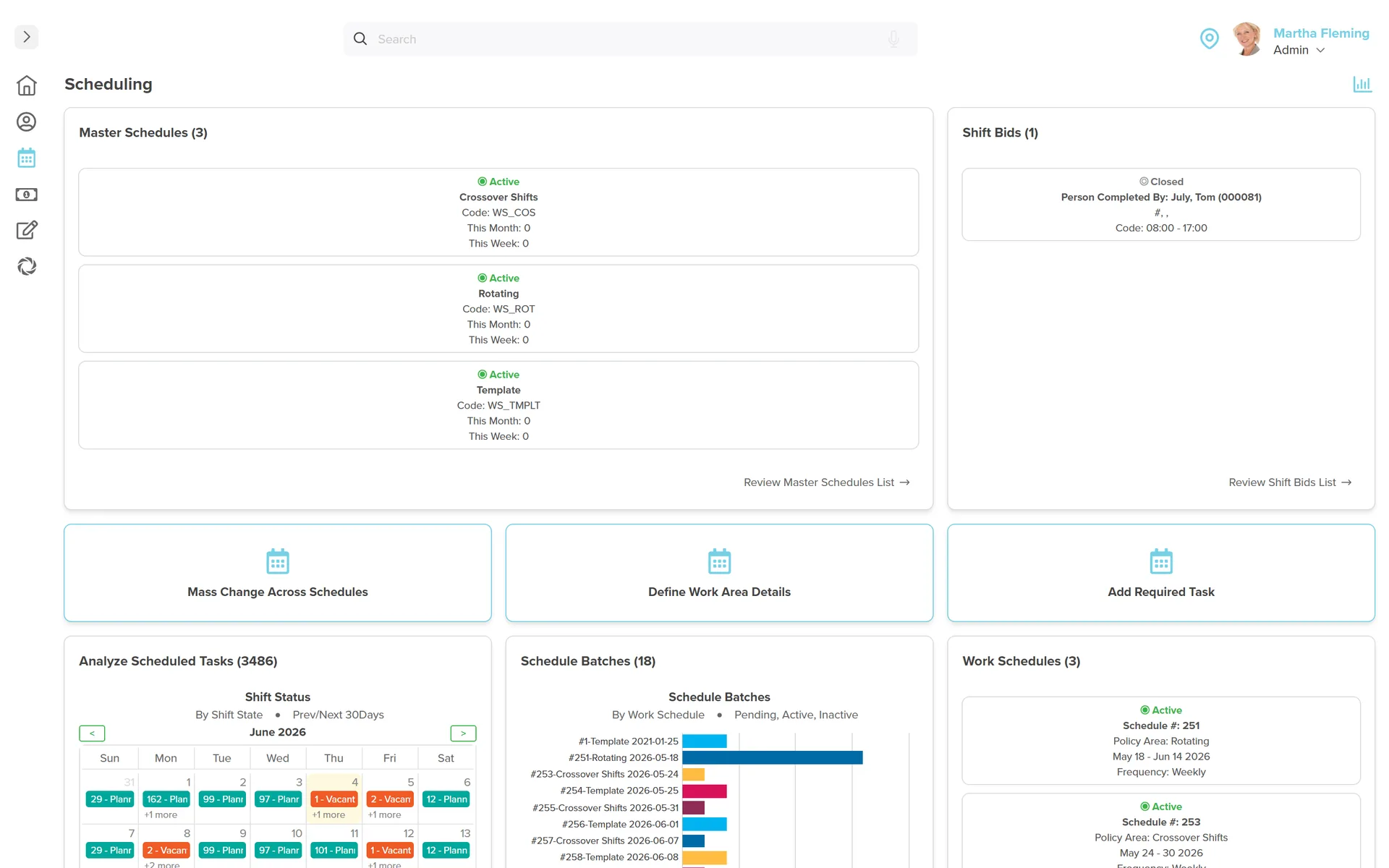
Workzoom Scheduling admin dashboard: master schedules and shift bids, a scheduled-tasks calendar of planned and vacant shifts, 18 schedule batches, work schedules, schedule templates, and 12 work areas and teams, with quick actions to mass-change schedules and define work areas.
View full-size screenshot
EMPLOYEE PARTICIPATION

Employees view schedules and bid on eligible shifts

Employees can view eligible vacant shifts and submit bids in self-service. A manager or administrator reviews the bids and assigns the worker.

A shift swap needs acceptance and approval; it is not an automatic two-way trade.

  • Let eligible employees bid on vacant shifts
  • Review bids before assigning coverage
  • Require acceptance and approval for shift changes
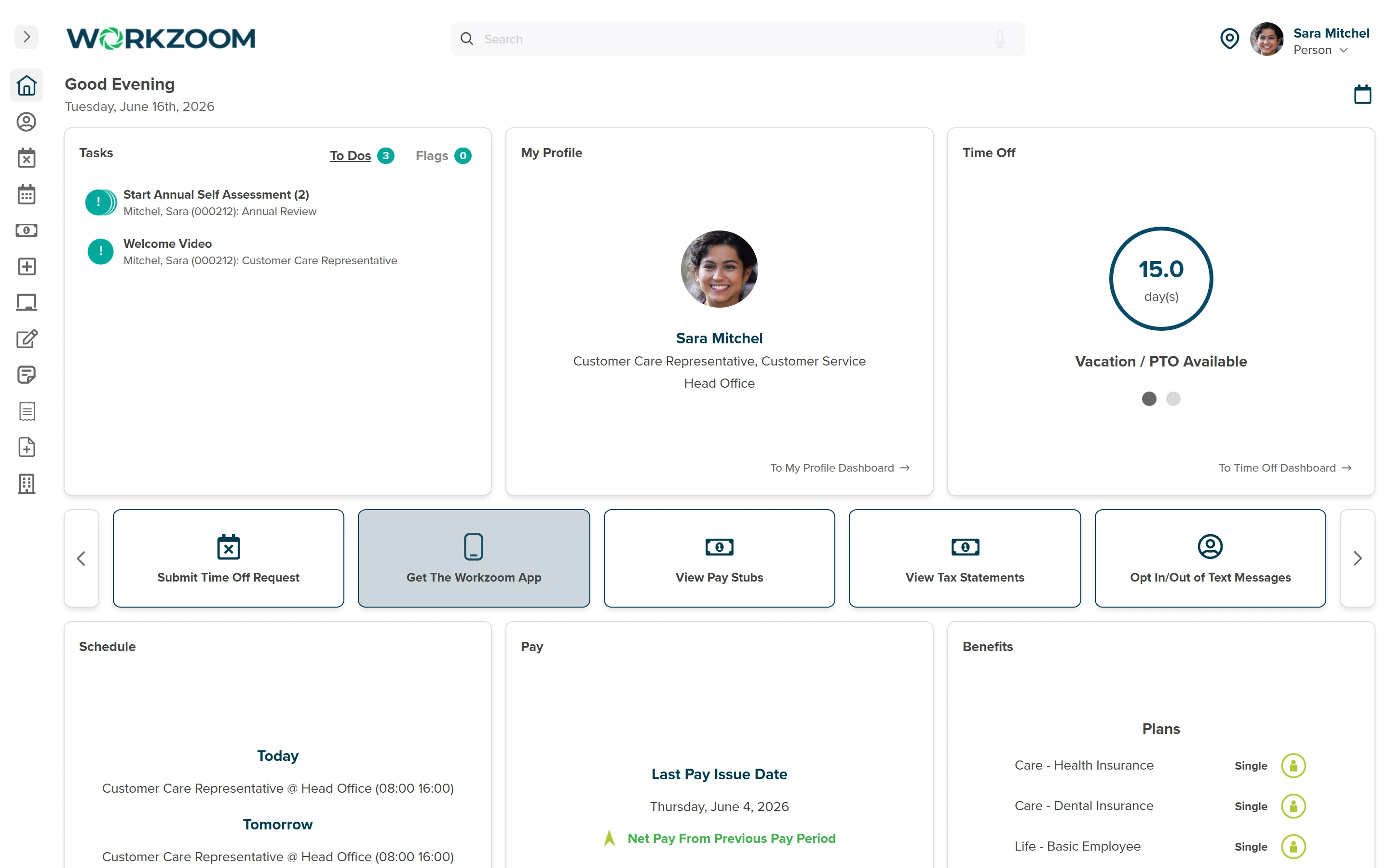
Workzoom employee self-service dashboard showing a worker Today and Tomorrow schedule, time off balance, pay, benefits, and a Get the Workzoom App action for mobile schedule access
View full-size screenshot
SCHEDULING AND PAYROLL CONNECTION

Connect the schedule to reviewed time and payroll

The schedule records planned work; timekeeping captures and reviews what was worked. Managers resolve daily exceptions, then configured time rules apply to recorded time.

Approved timesheet hours reach the matching pay run when approved before the Time Cut Off Date.

  • Review planned work alongside recorded time
  • Correct and approve missing punches and extra time worked
  • Confirm time and pay periods align
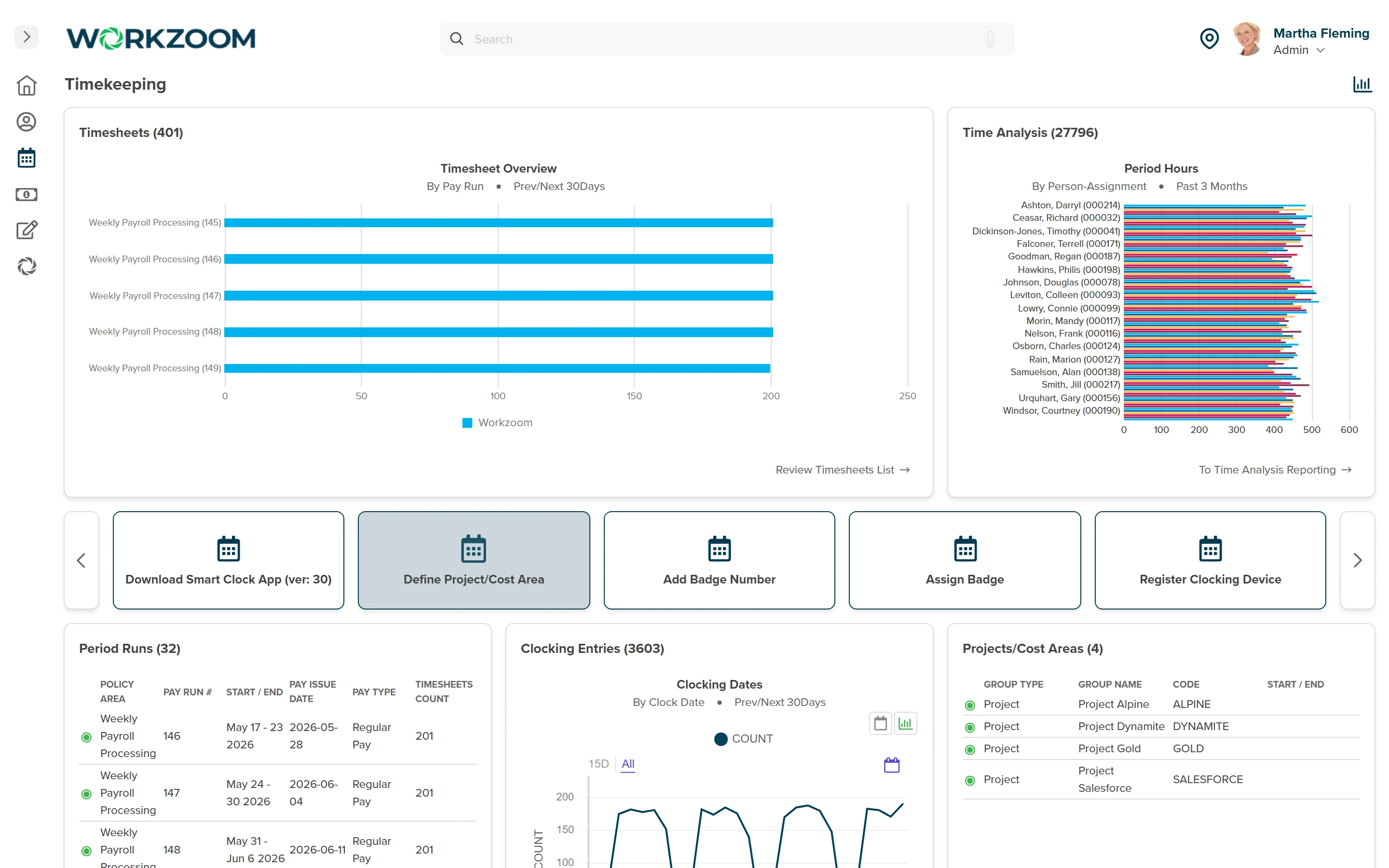
Workzoom Timekeeping dashboard showing timesheets by pay run, period hours by person, period runs with pay issue dates, and clocking entries that feed payroll
View full-size screenshot
OPERATIONAL STRUCTURE

Organize schedules around sites, teams and responsibility

Master schedules support multiple sites and managers. Scheduling teams can group staff under the supervisor responsible for schedules, time exceptions and leave requests.

Confirm those responsibilities and how each team maps to the schedule policy.

  • Review sites and their schedule owners
  • Group teams under the responsible supervisor
  • Check how schedules and approvals fit the operation
Workzoom Scheduling admin dashboard: master schedules and shift bids, a scheduled-tasks calendar of planned and vacant shifts, 18 schedule batches, work schedules, schedule templates, and 12 work areas and teams, with quick actions to mass-change schedules and define work areas.
View full-size screenshot

Compliance

What does Bahamas Scheduling compliance require?

Every requirement below is handled by the platform on every pay run, not configured per-customer.

Working Hours

Standard Hours and Overtime

The Employment Act defines standard hours and exceptions. Your team confirms which rules apply to each employee group and validates the timekeeping configuration; creating a schedule does not itself calculate pay.

Source: Bahamas Employment Act (Ch. 321A), ss.8 and 10

Holiday Pay

Public Holiday and Day-Off Premium Pay

Section 10 distinguishes overtime work on a public holiday or day off from other overtime. Validate the employee category and actual work performed before applying a configured premium.

Source: Bahamas Employment Act (Ch. 321A), s.10(a)

Hospitality Scheduling

Tipped Tourism and Hospitality Staff

Section 10 includes an exception for tipped categories in tourism and hospitality. Do not assume it applies to every gaming or restaurant role; confirm eligibility and the configured rule.

Source: Bahamas Employment Act (Ch. 321A), s.10(b)

Record Keeping

Wage and Hours Record Keeping

Keep the required wage records and review recorded hours alongside approved payroll inputs. A planned schedule is not evidence of the time worked.

Source: Bahamas Employment Act (Ch. 321A), s.61

$4
per employee, per month
1 record
across HR, payroll, workforce, and talent
10
countries supported1

How it works

An open shift. A manager-led decision.

Review the vacancy, compare candidates and assign coverage.

  1. Manager

    Reviews the open shift.

    Where scheduling is enabled, approved full-day leave removes scheduled start and end times and creates a vacancy. Partial-day leave adjusts the schedule.

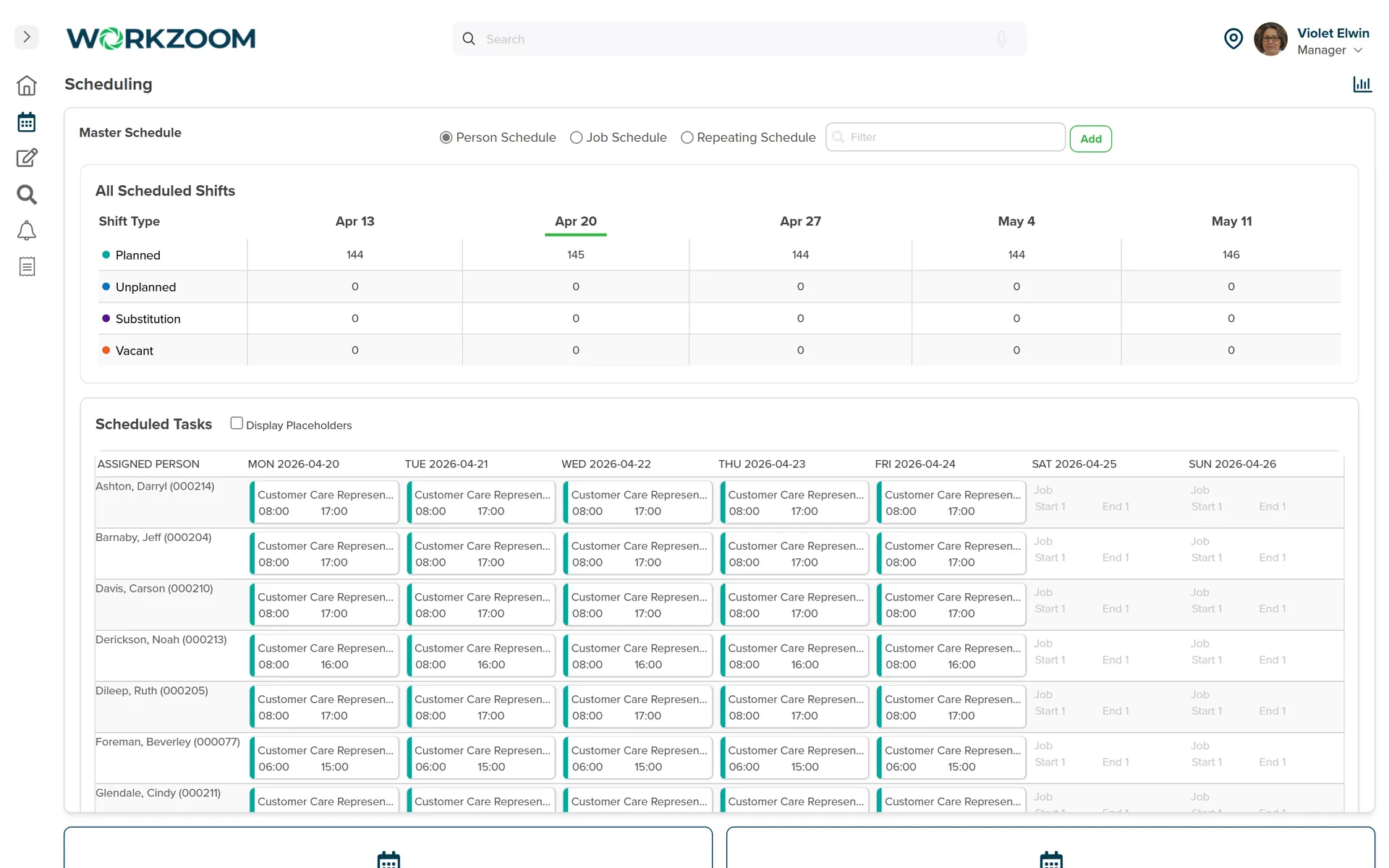
  2. Workzoom Scheduling product view showing master schedules and shift bids
    Manager

    Compares qualified workers.

    Qualified Fill ranks workers using configured criteria such as seniority, certifications, preferences and current schedules. Hard requirements can exclude a worker; an overlapping schedule does not always remove them from the list.

  3. Manager

    Assigns the replacement.

    Employees can bid on eligible vacant shifts. A manager or administrator reviews the bids and assigns the selected worker; a bid is not an automatic assignment.

Proof

Scheduling in the Bahamas

60+

locations scheduled from one system

Per the Island Luck case study, 850 employees are scheduled across more than 60 locations, with facial recognition clocks feeding approved hours directly into eight weekly payroll cycles.

We knew digitizing was necessary, but what mattered most was choosing a solution built for businesses like ours. Workzoom delivered the tools we needed, from payroll to facial recognition clocks, and worked with us to address challenges along the way. The platform aligned well with how Island Luck operates.
Tyler S., Human Resources Specialist, Island Luck Island Luck · 850 employees

Source:Case study

Read the full story

The story

In their words

The story

Cover an absence without guessing who can work

A vacancy needs more than a list of names. Workzoom’s Qualified Fill uses configured criteria such as certifications, preferences, seniority and current schedules. A manager reviews those factors and assigns the worker.

For a synthetic evaluation, approve a full-day absence at one site. Compare a worker missing a required credential with one who has an overlapping shift, then review a submitted bid. Confirm who makes the final assignment. This is a proposed demonstration, not a customer result.

The story

Choose the schedule model your operation needs

Workzoom supports rotating or pattern schedules for repeating staffing and template schedules for staffing that changes week to week. An edit to a generated schedule affects that period only. A template change can affect future generated schedules, so test that distinction before rollout.

Island Luck’s published story covers more than 60 Bahamian locations and eight payroll cycles a week. Its operational scale is proof of one implementation, not a requirement for a smaller employer to use scheduling.

The story

Keep planned shifts separate from paid hours

A planned shift is not the same as actual time worked. Configured timekeeping rules apply to recorded time; managers correct and approve exceptions before payroll. Approved hours feed the matching pay period when approved before cutoff.

Validate the applicable Employment Act requirements and employee categories with your team. Do not treat a configured premium or a qualified-fill ranking as a guarantee of legal compliance.

The story

Evaluate the scope before rollout

The Workforce Suite is US$4 per employee per month. Monthly minimums apply and the HR foundation is required. Additional suites change the package price. Implementation, migration, training and support are included; confirm your package and optional costs on the pricing page.

Ask to see one open shift, a qualified-fill comparison and the assigned replacement’s time record. Keep the demonstration focused on your own locations and approval responsibilities.

Bahamas pricing

Same $4 per suite. Same all-included terms.

$4 per suite $16 all four, USD per employee / month

No initial setup fees, no long-term contract. Implementation, migration, and training included.

Existing Workzoom customers add a suite for $4 USD per employee per month, the standard suite rate.

Scheduling in Bahamas

How Workzoom scheduling runs day to day in Bahamas, with the local statutory specifics teams ask about.

Coverage and shift changes

Workzoom master schedules support multiple sites or managers, each with its own schedule. Review vacancies, planned work and substitutions by job and demonstrate your site structure before rollout.
Workzoom Qualified Fill ranks workers against client-defined criteria. Required jobs or certifications can exclude a worker entirely; employees on leave or partly scheduled may appear lower in the list. The manager reviews the context and assigns coverage.
No. A manager or administrator assigns a bidder or another qualified worker. A swap needs the other employee’s acceptance and manager approval; a two-way swap requires both employees to submit a request naming the other.

Time, payroll and evaluation

The schedule records planned work. Configured timekeeping rules apply overtime and premiums to recorded time before it flows to payroll. Your team confirms the applicable rules and validates representative examples.
Review planned and actual work in timekeeping, resolve exceptions and approve hours before the Time Cut Off Date. Approved timesheet hours feed the pay run for the matching period. Scheduling does not guarantee zero overtime errors.
The Workforce Suite is US$4 per employee per month. Monthly minimums apply and the HR foundation is required. Additional suites change the package price. Implementation, migration, training and support are included; confirm your package and optional costs on the pricing page.

Ready to run Bahamas scheduling?

See how your team fills an open shift.

Bring one coverage gap. Compare qualified staff, review a bid and follow the assignment into timekeeping.

Workzoom works with organizations of 50 or more employees. See our minimums.

Loading available times.