Canada
 United States
 Bahamas
 Jamaica
 Trinidad & Tobago
 Antigua & Barbuda
 Barbados
 Anguilla













Payroll runs seamlessly, and HR processes are no longer a tedious grind. It's simplified how we work, allowing us to focus more on our people.
Date-effective compensation records with pay scale progression, compa-ratio analysis, and approval-routed changes the next pay run reads from. No spreadsheets, no sticky notes.
4.5 stars on G2 + Capterra. 49 third-party reviews.1
25+ years in production. Since 2000.2
100% in-house support. Never farmed out.14
$4 per employee / month / suite.3
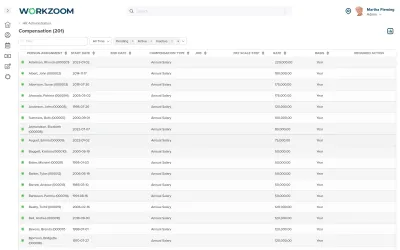
Workzoom compensation management software manages pay scales, rate changes, pay-scale-step progression, and compa-ratio analysis.
It keeps every pay change date-effective, routes a compensation change for review and approval, reflects a backdated adjustment in the pay run when it is approved, and keeps compensation on the same record the pay run reads. Because compensation management software is built into the HRIS, an approved change is read by the next pay run with no re-entry, and HR can generate total rewards statements against position and grade for employers with 50 to 5,000 employees.
Our clients
When pay is subjective, employees question fairness and managers cannot explain the reasoning. The connection between performance and reward is invisible.
Workzoom routes compensation changes through review and approval, and an administrator records the reason in the particulars, so a pay decision has a documented basis instead of resting on gut feel.
Every Workzoom suite shares the same employee data, so compensation stays current with payroll, HR, workforce, and talent without an export or an integration to maintain.
An administrator or manager submits a compensation change for review and approval, so a pay decision follows a record and an approval rather than a quiet edit. To note that an increase followed a review, an administrator records the reason in the particulars.
Approved compensation changes are recorded on the shared employee record, so the next pay run reads the updated rate without anyone re-keying it into a separate payroll system or preparing a CSV.
Date-effective records preserve every compensation change with its exact effective date so you can see what any employee was paid at any point in the past. Retroactive payroll adjustments and audit requests are answered from the system, not a spreadsheet.
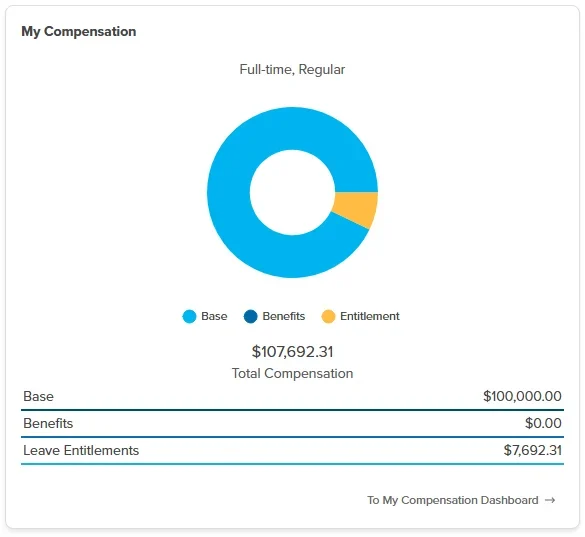
Workzoom keeps compensation on the same employee record as HR and payroll, so every salary change, increase, or structural adjustment is recorded once on the record the pay run reads. Compensation decisions sit on the same employee record used across every module.
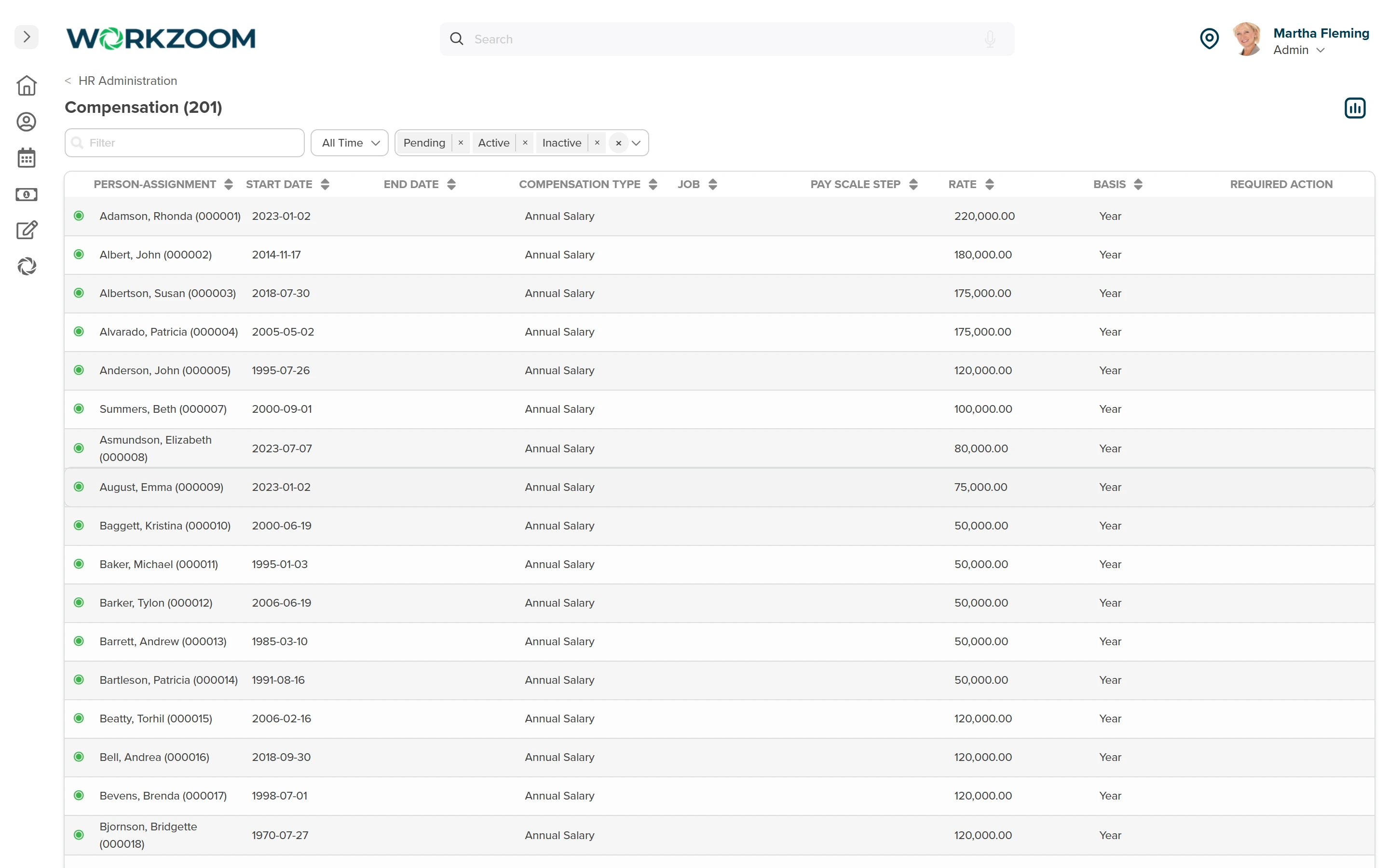
An administrator or manager submits a compensation change, and it is reviewed and approved or denied before it takes effect. A compensation change is not generated from a performance rating. If an increase followed a review, an administrator records the reason in the particulars so the link is documented.
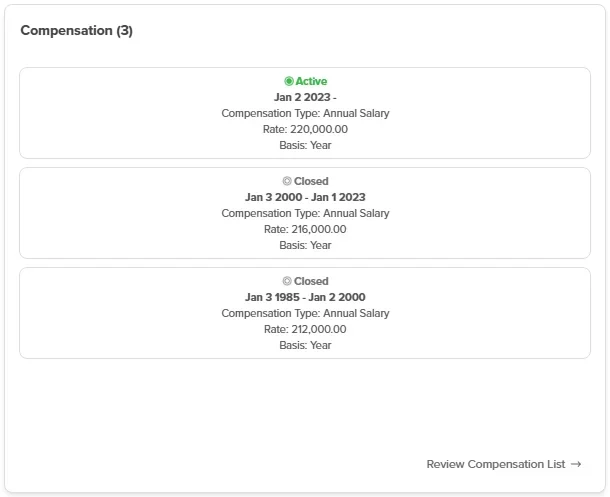
Workzoom's date-effective records preserve every compensation change over time instead of overwriting the previous value. You can see exactly what any employee was paid at any point in the past, which is essential for retroactive payroll, audits, and pay reviews.
Customer stories
Teams running Workzoom compensation on real payroll, real schedules, real headcount. View all case studies
Payroll runs seamlessly, and HR processes are no longer a tedious grind. It's simplified how we work, allowing us to focus more on our people.

Before Workzoom, we were buried in spreadsheets. Now HR is so much simpler. We spend less time on admin and more time supporting our staff and residents every single day.

What mattered most was choosing a solution built for businesses like ours. Workzoom delivered everything we needed, from payroll to facial recognition clocks, and worked with us every step.


We would not be able to hire the way we do with the same resources. It has kept our headcount consistent without growing it, saving us time and money every single cycle.


Workzoom completely transformed our payroll process in just one month. So easy to audit, validate, and make corrections, even at the last minute. The support we received was incredible.
Moving to Workzoom was the right move. It gave our dynamic report and payment structures the flexibility we needed, at the right price.

Switching to Workzoom made managing payroll and timekeeping so much easier. We processed our first payroll faster than we expected and now feel far more confident in everything we do.
Keep exploring
Pair Compensation with the rest of the HR Suite. One employee record, nothing to integrate or maintain.
The full employee lifecycle, application to termination, on a date-effective record that also runs payroll and scheduling. Change once, never re-key.
One employee record that drives HR, payroll, scheduling, and talent. Every job and pay change is kept with its real effective date, never overwritten.
The candidate you hire becomes an employee automatically: offer, onboarding, and first payroll off the same record, with no re-keying.
Workzoom is $4 USD per suite per employee per month, or $16 all-in for the full platform. No setup fees, no long-term contract. See pricing.
Get started
A 15 to 60 minute working session, not a slide deck. We walk through Compensation live, on your headcount and your industry, then give you a straight answer on fit and price.
Workzoom works with organizations of 50 or more employees. See our minimums.
Frequently asked
Specifics on how Workzoom compensation works, what it costs, and how it connects to the rest of the platform.