 Canada
 United States
 Bahamas
Employee Scheduling Software in Canada: What to Check

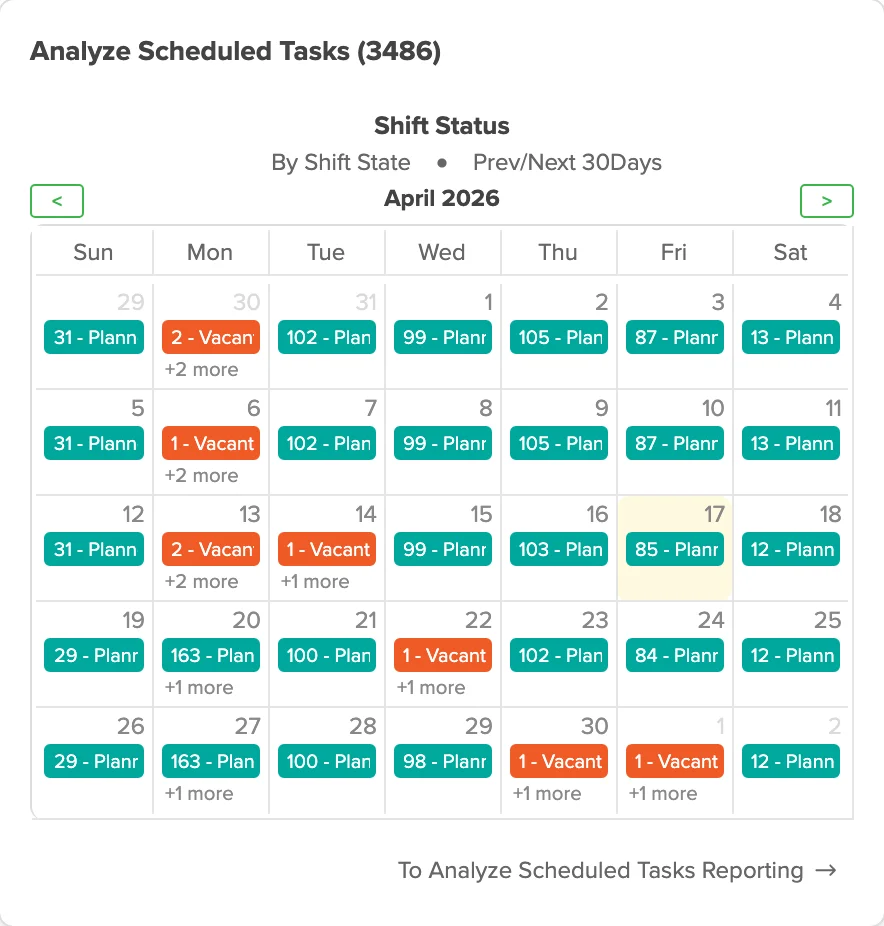
Workzoom answers the scheduling question Canadian employers have: does the software share one employee record with payroll. A filled shift, a province's hours-of-work rules and the resulting pay all need to point at the same number. Employee scheduling software in Canada earns its price when a schedule changes and the pay preview updates without anyone re-keying a thing. The checks below test vendors against that mechanism, not a feature list any calendar app could pass.
- The real test: do the schedule, the time clock and the pay run share one employee record.
- Provincial hours-of-work rules have to apply per position while the schedule is being built, not after.
- Self-service shift swaps and open-shift pickup cut down the phone-tree callout at 6 a.m.
- Workzoom prices the Workforce Suite, which includes scheduling and time, at C$4 per employee per month.
- Island Luck runs one schedule engine across more than 60 locations, with clocks feeding payroll at every site.
Picture a regional grocery chain where the scheduler builds next week's floor schedule mostly on Sunday night. She keeps three provinces open in three browser tabs. One tab is Ontario stores. Another is an Alberta location that added a second shift last month.
The third is a Manitoba store short two cashiers after a resignation. Every schedule she finishes has to survive a shift swap by Tuesday, a call-out by Thursday, and a payroll cutoff by Friday. None of that should mean re-entering a single hour by hand.
Disclosure: Workzoom wrote this guide and sells one of the products you might shortlist. Read our numbers the way you would read any vendor's, and check them.
What is employee scheduling software?
Employee scheduling software builds shift schedules from staffing needs, availability and qualifications. It publishes the schedule to staff and records swaps and call-outs. Approved hours then move to payroll. The useful test is whether the schedule, the time clock and the pay run share one employee record. Three separate files that someone reconciles by hand fail that test. Workzoom runs scheduling inside the Workforce Suite on that same record as payroll.
Most scheduling tools on the market solve half the problem. They place shifts on a calendar and stop there. A manager then translates the schedule into paid hours by hand. That translation step is where errors enter.
A shift moved on Tuesday might never reach payroll. A call-out gets covered at the wrong pay rate. A swap gets approved verbally and never logged anywhere.
A scheduling tool that cannot answer what a person got paid for a shift is a calendar with a nicer interface. Workzoom pairs its scheduling module with the same engine covered in our Canadian time tracking software guide. The schedule, the clock punch and the pay calculation stay on one employee record from the moment a shift is created.
A manager checking next week's schedule and a payroll clerk checking last week's pay run read the same data. They are not two systems that happen to agree most weeks.
What should Canadian employers look for in scheduling software?
Canadian employers should look for scheduling software that reads the same employee record as payroll. It should know the province of each position. It should apply that province's hours-of-work and overtime rules while the schedule is still being built. Approved hours should reach the pay run without re-keying. Staff should get self-service for shift swaps and open shifts, with clocks at every site. Workzoom does all of this from one employee record.
Most vendor demos show the schedule screen and stop. The schedule screen is the easy part. The harder test is what happens once a shift changes.
A province-specific rule should catch a conflict before the manager saves it. Otherwise the conflict surfaces weeks later, inside a pay run someone now has to unwind.
Ask each vendor to run through the checks below with your own province mix, not a generic demo account. A live answer, keyed to your own positions, tells you more in ten minutes than a features page tells you in an hour.
Workzoom's Canadian workforce management software connects scheduling, approved time and leave on one employee record. In a demo, check the configured jurisdiction rules and follow a changed shift through time approval to the pay run. The wider Workforce Suite includes the scheduling and timekeeping modules.
| What to check | Ask the vendor | Good answer sounds like |
|---|---|---|
| Provincial hours rules | Does the system flag a rule conflict before I save the schedule? | Names the province and the rule inside the schedule editor, before publish. |
| Payroll connection | Do approved hours reach payroll without a file export? | Shows the hours landing in the pay run live, with no re-entry. |
| Self-service swaps | Can staff pick up an open shift from a phone? | Demonstrates a swap request, manager approval and the updated schedule in one flow. |
| Multi-site visibility | Is one schedule visible across every location, or one per site? | Shows a manager switching sites inside the same login. |
| Time clock fit | Does the same record feed the schedule and the time clock? | Points to one employee record, not a nightly sync job. |
How do Canadian hours-of-work rules change scheduling?
Canadian hours-of-work rules are set provincially. A schedule that clears one province's daily limit, rest-between-shifts rule or weekly-maximum test can still breach another province's version of the same rule. Scheduling software has to know the province tied to each position. It has to check the rule while the manager is building the shift, not after payroll has already run. Workzoom applies these rules per position, from the policy configured at implementation.
Source: Ontario, Your guide to the Employment Standards Act: hours of work, read 2026-09-15.
A schedule that looks compliant in one province can quietly break in another. This happens the moment a manager copies a shift pattern across locations. Daily limits, the rest required between shifts, and weekly-maximum tests are all set at the provincial level.
A system that checks only one jurisdiction's version of these rules gives a false sense of safety everywhere else. The fix is not a bigger spreadsheet of rules.
The fix is software that attaches a province to every position. It checks the applicable rule while a manager is still building the shift, the same way it would flag a double-booked employee.
Ontario's own explanation of its hours-of-work rules is worth reading directly, not through a vendor's summary of them. Alberta's Employment Standards Code is worth the same direct read. The mechanisms differ enough that a rule configured for one province should never be copied into another without checking it first.
See our Canadian coverage page for how that policy configuration works across provinces.
Why should scheduling and payroll share one employee record?
Scheduling and payroll should share one employee record because every scheduling error becomes a pay error the moment someone re-keys it into a second system. With one record, the position's rate, premiums and province travel with the shift automatically. Approved hours land in the pay run as soon as they are approved. A schedule change and the pay it produces never quietly disagree. Workzoom's HR, Payroll, Workforce and Talent suites read and write that same record.
Island Luck is a Bahamas client, not a Canadian one. The mechanism is the same one a multi-province Canadian employer needs: one schedule engine and one employee record behind every site.
Island Luck runs Workzoom for 850 employees across more than 60 locations in Nassau, Freeport and the Family Islands. It processes eight payroll cycles a week.
Facial recognition clocks at every site feed hours straight to payroll. A shift scheduled at one location and worked at another still lands on the correct pay run, with nobody reconciling a spreadsheet between sites.
That is the same test a Canadian employer running stores across three provinces should apply. The question is not whether the schedule looks tidy on screen. It is whether the hours it produces reach payroll correctly at every location, every cycle.
Read the full Island Luck case study for the detail behind those numbers.
What does employee scheduling software cost in Canada?
Employee scheduling software in Canada is usually priced per employee per month. Time clocks, the payroll connection and support are commonly sold as add-ons that move the real price. Workzoom prices its Workforce Suite, which includes scheduling and time, at C$4 per employee per month. All four suites together run C$16, with a C$700 monthly minimum for organizations under 100 employees. Implementation, training and support are included.
Ask every vendor for the same three numbers before comparing a quote. Get the base per-employee rate, what ships inside it, and what gets billed separately once you are live. A time clock, a payroll connection and live support are the three add-ons most likely to turn an attractive rate into a larger invoice. That invoice often lands by month two.
Workzoom includes web, kiosk and biometric clocking inside the Workforce Suite rate. The payroll connection and support are included too, rather than priced separately. Implementation and training are included rather than billed hourly.
See the full breakdown on our pricing page before comparing quotes. Ask any other vendor on your shortlist for the same numbers, and get every figure confirmed in writing before you sign anything.
Run the demo on your own schedule, not theirs
The fastest way to separate a real scheduling engine from a calendar with a nicer skin is to stop watching the vendor's script. Bring your own week instead. Build one real week of shifts across two provinces, using your actual positions and pay rates. Include at least one employee who works at more than one site.
Then break it on purpose. Add a call-out on a shift that starts in two hours. Watch how the replacement gets found: an automatic, credential-checked fill list, or a manager scrolling contacts.
Request a shift swap between two qualified employees. Watch whether a manager approves it inside the same screen, or chases an email thread instead.
Change an approved shift after the fact and watch what happens next, since that is the test that matters most. If the pay preview for that pay period does not move, the schedule and the pay run are not connected, whatever the sales page claims. Our piece on scheduling software surviving a real callout walks through the same test from the manager's side.
A vendor that welcomes this kind of demo is telling you something. One that steers you back to the script is telling you something else. The same test belongs in a wider evaluation: our nine checks before you buy HR software cover contract terms and data ownership, and the HRIS guide for Canadian mid-market employers covers what a schedule feeds once it reaches payroll. What you are buying is a living schedule tied to a living pay record, as opposed to a calendar that someone re-types every second Friday.
How useful was this page?
What should we improve?
FAQ
What readers ask after this post on employee scheduling software.
Our clients
The teams that run their people on Workzoom.













Workzoom handles HR, payroll, workforce, and talent on one employee record. Book a Walkthrough.
Related reads
View all in Workforce





Get started
Built around your org. See it run live.
A 15 to 60 minute working session, not a slide deck. We look at your org, map the right suites, and show you what to expect on pricing. If we're not a fit, we'll say so.
Workzoom works with organizations of 50 or more employees. See our minimums.