 Canada
 United States
 Bahamas
 Jamaica
 Trinidad & Tobago
 Antigua & Barbuda
 Barbados
 Anguilla
HRIS Software in Canada: A Mid-Market Buying Guide

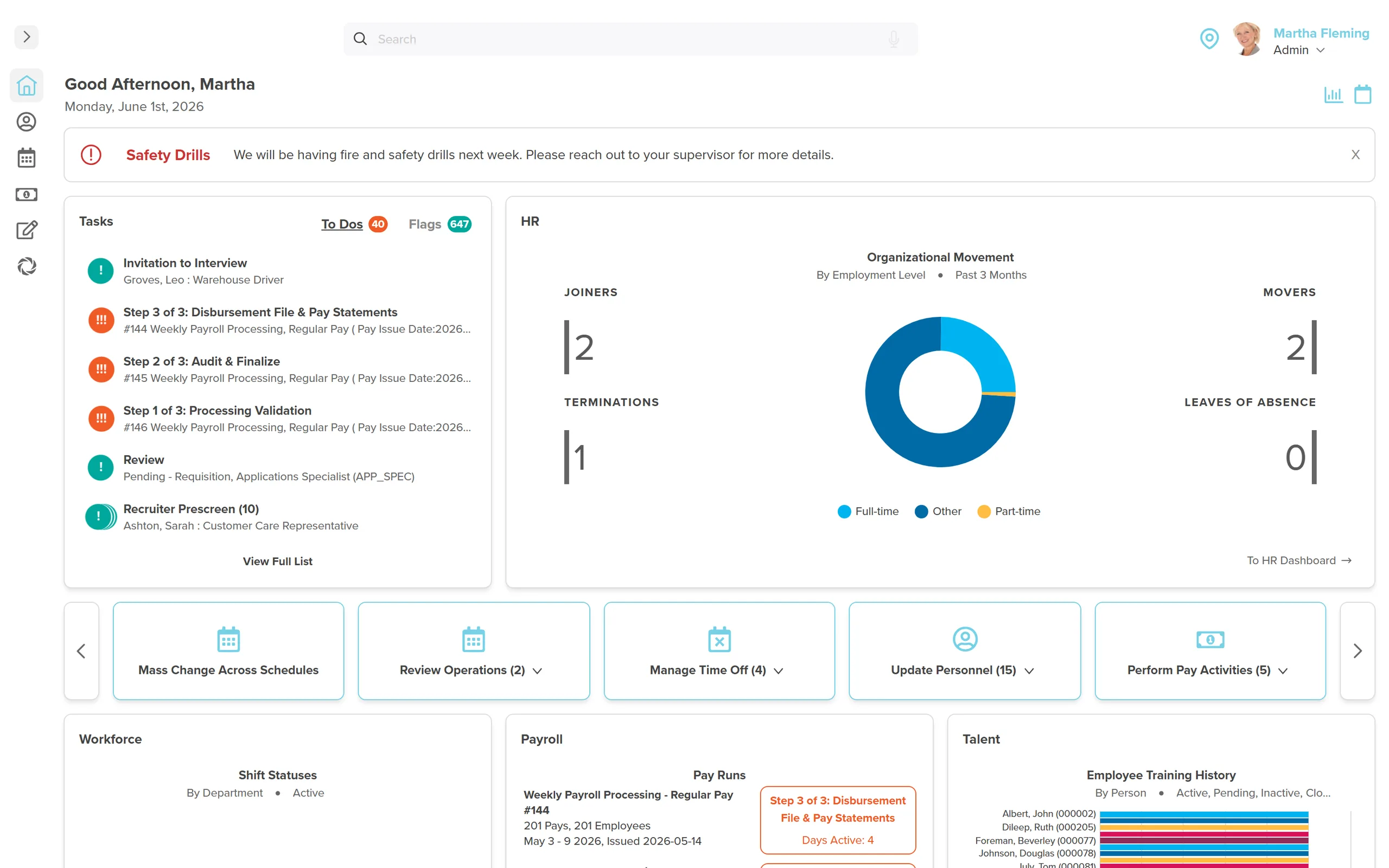
HRIS software manages employee records and HR workflows. Payroll, scheduling and talent may be separate modules, so Canadian buyers should test the handoffs rather than trust the acronym. Follow a hire or province transfer from the HR record through approval to payroll, and confirm the quoted scope. For product evaluation, see Workzoom's Canadian HR and HRIS software; for terminology, read what HRIS means.
- Compare the employee-record workflow first: a hire, a province transfer, a manager approval and the related pay change.
- HRIS, HRMS and HCM describe different scopes. Ask which HR, Payroll, Workforce and Talent modules are included.
- If payroll is in scope, verify Canadian deductions, year-end output, ROE preparation and submission responsibilities in a live demo.
- Workzoom publishes per-suite CAD pricing, required HR foundation and monthly minimums on its pricing page.
- Headcount alone does not establish fit or return. Use your employee groups, jurisdictions and handoffs to compare vendors.
What HRIS Software Actually Does Every Day
HRIS software isn't about software. It's about getting HR out of the administrative weeds so the team can do the work that actually moves the business.
It is easy to describe HRIS software in abstract terms. Harder to explain what it actually changes about how HR works on a Tuesday.
Consider a leave request. The employee checks Remaining and future Booked leave separately, then submits the request. The manager reviews it with the team calendar. Approved leave is available to the connected payroll workflow. Remaining reflects processed activity once the related pay run closes, so an approval should not be mistaken for a settled balance.
That pattern repeats across everything HR touches.
A new hire starts. The onboarding system sends them their TD1 forms, direct deposit setup, and H&S training before day one. When they arrive, IT and payroll already have what they need because it flows from one database. No faxing forms between departments.
An employee asks for a pay stub from two years ago. They pull it themselves from the self-service portal in 30 seconds. HR gets the time back.
Pay run closes. HRIS generates the CRA remittance file, the ROE for the employee who resigned last week, and the payroll journal for accounting. Not three separate systems. One.
That is what HRIS software does every day. It removes the administrative plumbing that HR spends most of its time on.
The Real Cost of Running Fragmented HR Systems
Most mid-sized Canadian companies don't start with fragmented HR. They grow into it.
You hire your first HR person. They use the accounting software for payroll and a spreadsheet for everything else. You hit 80 employees. Someone adds a scheduling tool. Hit 150 and you buy a standalone ATS for recruiting. By 250 employees you have four or five separate systems, none of which talk to each other, and your HR team spends a third of every week reconciling data between them.
The visible cost is labour time. The invisible cost is errors.
When payroll and HR are separate, employee changes don't always make it across. A salary change approved in HR doesn't show up in payroll until someone manually re-enters it. A termination processed in the HR system doesn't automatically stop the next direct deposit. Overtime worked gets missed because the scheduling tool and payroll don't share data.
There is also a compliance exposure most companies don't quantify. In Canada, payroll errors create CRA liability. An ROE filed late or with incorrect insurable hours can trigger audits and penalties. The SHRM HR research library tracks how integrated HRIS adoption reduces payroll error rates. Provincial employment standards vary by jurisdiction, and a system that doesn't enforce those rules leaves you exposed. None of that shows up in your monthly software cost comparison. It shows up later.
The cost of fragmented HR systems is not only the monthly fees for five separate tools. It is the staff hours reconciling data, the errors that slip through, and the compliance gaps that don't surface until CRA is asking questions.
What to Look for in HRIS Software: A Canadian Buyer's Checklist
There are hundreds of HRIS products on the market. Most of them are built for US buyers. The feature set looks similar on every sales deck. The differences that matter for Canadian employers often aren't on the homepage.
Canadian Payroll Compliance (Non-Negotiable)
CRA compliance is not a checkbox. It is a deep technical requirement. The HRIS you choose must handle CPP contributions, EI premiums, federal and provincial tax withholding, year-end T4 and RL-1 (Quebec) generation, ROE filing, and remittance scheduling out of the box. Not as an add-on. Not as a future roadmap item.
Ask your vendor to walk you through a ROE filing. Ask how the system handles mid-year tax changes. Ask how it manages provincial rules if you operate in multiple provinces. If they can't demo those workflows fluently, that is your answer.
Provincial Variations
Employment standards in Canada are not federal, they are provincial. Overtime thresholds, vacation pay calculations, statutory holiday pay rules, and termination entitlements differ between Ontario, British Columbia, Alberta, Quebec, and every other province. A payroll system that treats Canada as one uniform ruleset will create compliance problems at scale.
If you have employees in more than one province, ask who confirms the applicable jurisdiction and eligibility, how the rules are configured and how your team reviews exceptions before payroll approval.
Bilingual Support
Quebec has legal requirements around French-language communication with employees. But bilingual capability is also a practical need for any employer with a mixed French-English workforce. Verify that employee self-service, pay stubs, and communications can be delivered in French where required.
Single Database vs. Integrated Systems
This is the architecture question that separates good HRIS products from ones that create new problems. Some platforms are built as a single unified database where HR, payroll, workforce, and talent share the same employee record. Others are stitched together from acquired products that sync via middleware.
The first kind: change an employee's address once and it flows to payroll, scheduling, and benefits instantly. The second kind: you change it in HR and then wait for the nightly sync, hope nothing breaks, and reconcile when it does.
Ask directly: “Is this a single database or integrated separate systems?” The answer matters for data accuracy and for the ongoing admin burden on your team.
Implementation Time and Support Model
A system that takes six months to implement is not saving you time. Budget 30-90 days for a realistic implementation depending on your headcount and complexity. Ask for the vendor's average go-live time with clients at your company size, not the marketing claim on their website.
Support matters too. Find out if you get named contacts or a call-centre rotation. For payroll specifically, you need someone who knows your configuration when a pay run has a problem on a Thursday at 4 PM.
Canadian-Specific Requirements Most US Software Gets Wrong
Most buyers don't find out until year-end that their US-built platform treats Canada as an afterthought. By then the contract is signed.
US-headquartered HRIS vendors treat Canada as a satellite market. The platform is designed for US compliance, and Canadian payroll is bolted on later.
Here is what that looks like in practice.
ROE generation gets handled as a manual export rather than an automated workflow. T4s require separate configuration or year-end service fees. QPP (Quebec Pension Plan) rules for Quebec employees are either not supported or require manual overrides. Provincial employment standards don't auto-enforce.
This is not theoretical. Canadian employers using US-built HRIS platforms consistently report needing workarounds for year-end processing, Quebec compliance, and government remittances. Those workarounds take time and create error risk.
When evaluating software, ask specifically about ROE filing, RL-1 slips, QPP vs CPP split for Quebec, and multi-province employment standards. If the demo goes blank on those questions, you have your answer.
For a broader comparison of what's available in Canada right now, the best HR software in Canada breakdown covers the main options side by side.
What Does HRIS Software Cost in Canada?
Vendor quotes can include different modules, implementation work and support. Compare the same scope before deciding which subscription is less expensive. Ask for the monthly minimum, required foundation, migration responsibilities, optional services and renewal terms in writing.
Workzoom publishes $4 CAD per employee per month per suite. HR is the required foundation. All four suites are $16 CAD per employee per month, with a $700 CAD monthly minimum. At 200 employees, the four-suite subscription is $3,200 CAD per month before taxes or optional costs. Use your own headcount and the suites you need to compare a quote.
Pricing Reality Check: What to Ask Every Vendor
- What is the per-employee monthly fee, broken down by module or suite?
- Are there setup or implementation fees?
- Is this a multi-year contract or month-to-month?
- What does year-end processing cost? (Some vendors charge extra for T4 filing.)
- Are API integrations included or priced separately?
- What happens to pricing at renewal?
Get those answers in writing before you sign anything.
Who Needs HRIS Software (and Who Can Wait)?
Not every company needs a full HRIS platform. Here is a plain answer on when it makes sense.
You Probably Need HRIS Software If:
- You have 50+ employees and HR is still running on spreadsheets or basic accounting software payroll
- You run payroll in multiple provinces and employment standards compliance is a concern
- Your HR team spends more than a day per week on manual data entry, report pulling, or reconciling systems
- You have had a payroll error or CRA discrepancy in the past two years
- You are using three or more separate tools for HR functions that don't connect to each other
- You are growing fast and onboarding is getting chaotic at your current pace
You Can Probably Wait If:
- You have fewer than 30 employees, payroll is simple, and your current setup is genuinely working
- You are in a pre-funding startup where every variable is changing and locking into any system is premature
- You have recently implemented a system in the last 12-18 months and haven't fully utilized it
The 50-employee threshold is a common inflection point. Below it, manual processes have low enough volume that the overhead is manageable. Above it, the administrative load starts compounding and the cost of not having integrated systems becomes real.
Where Workzoom Fits In
Workzoom's Canadian HR and HRIS software serves employers with 50 to 5,000 employees. The HR, Workforce, Payroll and Talent suites use one employee record. Start with a hire or province transfer and follow the dates, approvals and payroll changes through the proposed suite scope.
In our analysis of the Canadian teams we work with on discovery calls, the same pattern shows up: the hours lost aren't to the work itself, they're to moving the same employee change between systems that should already share it.
The architecture that enables that is effective dating combined with the person-position model. Each employee holds a position in the org structure. Compensation changes, role moves, and leave events carry an effective date. That means payroll picks up changes accurately on the right cycle, and historical reporting stays clean, without a separate data-entry step each time something changes.
County of Renfrew (Ontario, approximately 900 employees) onboarded 32 employees in three months using Workzoom's onboarding automation. Zero paper. The same platform runs their payroll, scheduling, and HR records without a separate sync between tools. Ktunaxa Nation (BC, 200+ employees) uses Workzoom for multi-entity payroll across band organizations, where position control and cost-centre allocation handle the funding-split complexity that generic HR software cannot.
Pricing is published: $4 CAD/employee/month per suite. No setup fees. No contracts. Month-to-month.
Payroll is live in Canada (CPP, EI, federal and provincial tax, T4s, RL-1s, ROEs, CRA remittances), the US, and the Bahamas. HR, Workforce, and Talent are available for Jamaica and Trinidad and Tobago employers; the payroll engine is capable of handling both statutory stacks, contact us about payroll for those countries and your timelines.
If your HR team is drowning in manual re-entry and reconciliation, you're not the problem. The disconnected tools are. The right system gives those hours back.
Workzoom is not the right fit for every company. If you need payroll in countries outside Workzoom's supported coverage or a much larger enterprise configuration, compare vendors against that exact requirement. For a Canadian employer with 50 to 5,000 employees, the useful test is whether the proposed suites handle your real HR-to-payroll workflow at the quoted scope and price.
Tell Us What You Need to See
Bring your current setup to the call. We will show you exactly how Workzoom handles your specific payroll requirements, provinces, and headcount. No slides, no pressure. Real numbers in 30 minutes.
Tell Us What You Need to SeeSee Workzoom in 30 minutes.
Real product, real questions, no slides. Starts at $4 per employee per month, CAD or USD, with $0 setup fees.
What readers ask after this post on HRIS software.
Our clients
The teams that run their people on Workzoom.













Workzoom handles HR, payroll, workforce, and talent on one employee record. Book a 30-minute walkthrough.