 Canada
 United States
 Bahamas
From HR to payday: bringing your Bahamas payroll together

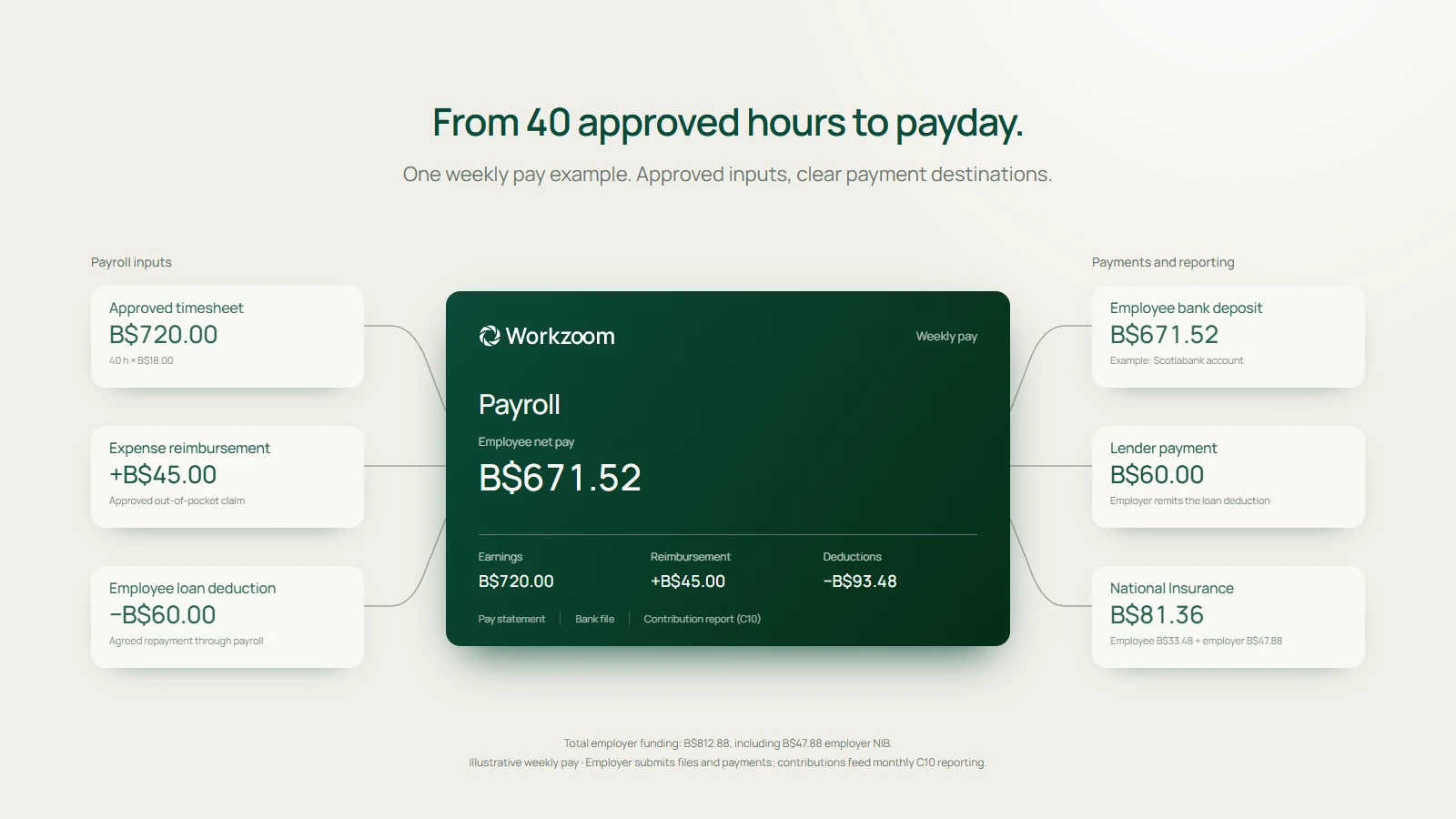
An outstanding leave request. A timesheet waiting for approval. A new pay rate, a bonus to add and an expense to reimburse. Your payroll team needs all of that information, along with the deductions, National Insurance contributions and payment details that complete the pay run.
A pay run brings together the employee payments processed for a particular group and period. If you run HR or payroll for a Bahamian employer, you'll recognize how many people contribute to that process. Employees submit information. Managers review it. HR confirms changes to employment and pay. Payroll brings the approved inputs together, and finance needs to understand what will be paid and to whom.
When those details sit in separate systems, your team has to keep them lined up. An approval in one place needs to reach another. A rate change needs to apply from the right date. An expense that's already been paid needs to be distinguished from one the employee is still owed.
Connecting those steps gives everyone a clearer part in the same process. So let's walk through a payroll process for Bahamian employers, from the work still waiting for approval to employee payments, lender deductions and National Insurance reporting.
Start with everything that belongs in the period
Before I get into the calculation, I want to understand how your payroll operates. Which employees share the same pay frequency and cycle? Those employees form a pay group. You might have one group paid weekly and another paid monthly. Which locations and businesses are included? Who approves the information for each group?
You also need to understand which employees share employment rules and entitlements. Workzoom calls these groups worker classes. You might have full-time hourly employees, part-time hourly employees and permanent salaried employees, with different arrangements for hours, leave or benefits. Policies can apply to those classes, so the appropriate rules follow the employee's classification.
Pay groups organize the payroll cycle. Worker classes help determine which employment rules and entitlements apply within it. Both matter when reviewing someone's pay.
The reporting structure matters as well. A job describes a role and its responsibilities. A position is a specific post within the organization. You might have several positions for the same purchasing-clerk job, each occupied by a different person. The record linking an employee to their job or position is their work assignment.
Defining management responsibilities around those jobs and positions is what we mean here by position-based management. Your organization records which role manages which team, then assigns the person who currently fills that role. Workzoom recommends job-to-job reporting relationships, with distinct supervisory jobs where supervisors manage separate teams.
For payroll, that structure helps establish who reviews an employee's leave, timesheets and other requests. When a manager changes roles, the organization can update the assignment within the established reporting structure. Requests still follow the configured approval workflows, including any specific routing used for timekeeping.
Those details determine how the pay run is set up. In Workzoom, separate payroll processing policies support different pay frequencies and cycles. Employee work assignments determine who belongs in the run, while dated pay rate records establish the rate that applies.
The preparation also needs to account for people joining, changing roles or leaving. A new employee needs the relevant employment, compensation and banking details in place. A change to someone's work assignment or pay needs to be reviewed for the period it affects.
That gives payroll a starting point: the right people, the right period and the employee information that applies to it. From there, you can look at the work still outstanding.
Work through the leave and time approvals
A large list of outstanding leave requests needs context. Some requests may concern next month's vacation. Others may relate to an absence that has already happened during the period you're about to pay.
The same applies to timesheets. You need to know which employees still need to submit, which submitted timesheets need a manager's approval and which time exceptions need to be resolved.
For an illustrative example, picture the review before your next pay run. One employee has already taken leave, but the request still needs approval. Another has submitted a timesheet with a missing clock-out. Someone else has requested vacation for next month. All three need a response, but the first two affect the period you're about to pay. Working through the dates and the person responsible gives your team a practical way to prioritize that list.
Workzoom provides leave-request workflows and Leave Requests Pending Approval reporting. Managers receive action items to review submitted timesheets, and configured time-batch workflows bring time exceptions forward for review.
So you can work through the questions that matter for the period:
- Which leave requests still need a decision, and when does the leave occur?
- Which timesheets are missing or awaiting approval?
- Are there missed punches, additional hours or overtime entries to review?
- Who needs to take the next action before the cutoff?
Once leave is approved, it can flow into the employee's schedule, timesheet and payroll. Reviewed time is categorized through the configured time rules, then picked up in payroll processing.
There are separate HR and time cutoff dates in Workzoom. These are the deadlines that determine whether employee changes and approved time reach the current pay run. Time approved after the configured cutoff moves to a later cycle. Making those dates clear helps employees, managers and payroll coordinate their work throughout the period.
Bring compensation changes, bonuses and expenses into the review
Alongside the hours, payroll needs to understand the other changes affecting what an employee receives.
Pay rate changes need an approval and an effective date. Workzoom calls these compensation changes. A proposed rate increase may still be waiting for a decision. An approved increase may begin partway through the period. A backdated increase may require retroactive pay: the additional amount owed for an earlier period.
Workzoom keeps dated compensation records and supports approved compensation batches for eligible groups of employees. Once an eligible batch is approved, the previous compensation record closes and the new one begins on the specified effective date. Your team still needs to check the employees, dates and scope of the change, including any retroactive adjustment required.
Bonuses need to reach the appropriate pay run. That might be a bonus added to the regular payroll or a payment that needs an extra run. Workzoom supports imported bonus and other pay entries, along with extra pay runs for payments that cannot wait for the regular cycle. Payroll needs to confirm the recipients, amounts, approval and timing before processing. Explore Workzoom pay processing.
Approved expenses need to reach the employee's reimbursement. An employee may have paid for travel, mileage or another business expense out of pocket. Their claim needs the supporting details, the required approval and the correct reimbursement amount.
Workzoom connects expense claims and approvals to payroll, so approved reimbursements can appear on the employee's next pay statement. Your team can follow the claim through to the payment. Company-card spending and amounts already covered by an advance also need to be accounted for when checking what the employee is still owed. See how expense reimbursement works.
These inputs can all affect the same employee in the same period. Their hours, leave, new rate, bonus and reimbursement need to arrive with enough context for payroll to review each one using the appropriate payroll treatment.
Account for employee loan repayments and other deductions
An employee may repay a bank, credit union or another lender through an agreed deduction from their wages. You may know this as third-party lending, payroll loan deductions or lending-account deductions. Here, we'll call these employee loan repayments.
Workzoom supports these loan repayments through lending accounts, with deductions configured as a fixed amount or a percentage of pay. Those deductions form part of the employee's payroll calculation and need to be checked against the agreed lending arrangement. The lender manages the loan; your team manages the agreed payroll deduction and corresponding payment. See Workzoom's lending-account support.
Your team needs to confirm whose deduction is active, which lender it relates to, the amount being deducted and how the corresponding payment will reach the lender. The payment arrangement and any required output should be confirmed during setup, with a named person responsible for completing and checking that step.
Benefits, pension contributions or other applicable deductions also belong in the review. The aim is to understand the employee's earnings, reimbursements and deductions together, including how they affect the amount the employee receives and any amounts payable elsewhere.
Follow National Insurance through to the C10 statement
Bahamian payroll also needs to account for employer and employee contributions to the National Insurance Board, or NIB. The C10 contribution statement is the monthly report showing those contributions for each insured employee.
Workzoom calculates NIB contributions from payroll data and generates C10 reporting. That connects the statutory output to the pay information your team has reviewed. See Workzoom's Bahamas payroll scope.
Your team then reviews the statement, submits it and pays the contributions. Include those steps in the payroll calendar and confirm who owns each one. NIB provides employer guidance on contributions and payment responsibilities.
There are several amounts to understand here: what employees receive, what has been deducted from their pay, the employer's own contribution and any other payments arising from payroll. Finance needs that complete picture when reviewing the cost and the payments to be made.
Review the whole pay run before moving to payment
By this point, the employee's pay may reflect approved hours, paid or unpaid leave, a compensation change, a bonus, an expense reimbursement and an agreed loan deduction, alongside the applicable statutory calculations.
Payroll needs to be able to review those details individually and understand the total.
Workzoom's processing workflow provides individual pay details, reports and pay statement comparisons to help administrators review changes before approving the run. If something needs an adjustment while the run is open, payroll can make the appropriate change and recalculate.
For example, a higher payment might reflect additional hours, a bonus and a reimbursement in the same period. Looking at the underlying entries gives the reviewer a way to confirm why the amount changed. The same review should account for people who have joined or left and any changes to recurring deductions.
The final checks include the run's earnings, deductions and net pay: the total payable to employees after the relevant earnings, reimbursements and deductions have been applied. Payroll also checks the payroll clearing total, the amount being disbursed through the bank, against the run's net pay. Finance needs to account for employer contributions and amounts payable to lenders or other parties under the arrangements in place.
Once approved, Workzoom generates the configured bank file for employee payments. Your team reviews it and uploads it to your bank, which processes the payment. The bank format is confirmed during implementation. Workzoom does not hold or move payroll funds.
Employee pay statements, lender-payment information, National Insurance reporting and payroll accounting outputs each serve a purpose after processing. Your team needs to know what is available, what needs to be submitted and who completes each step.
A connected process, supported by local experience
Cable Bahamas provides a local example. Its published customer story reports that payroll processing fell from 5 days to 1.5 days, with three payroll staff managing an 850-employee organization across Nassau and the Family Islands. Read the Cable Bahamas customer story.
The story describes time entry flowing directly to payroll and self-service leave requests routed for approval within Workzoom. Those connections supported the team's move away from passing spreadsheets between HR and payroll.
Island Luck shows another side of the same challenge: managing payroll across locations and pay cycles. Its published story describes eight payrolls a week across more than 60 Bahamian locations, with weekly, biweekly, monthly and bonus runs. The team connected timekeeping and payroll across that operation. Read the Island Luck customer story.
Those are two different operating situations. Cable Bahamas provides a measured processing-time result; Island Luck shows the scale of coordinating locations and payroll streams. For your organization, the useful starting point is to follow your own pay period from beginning to end. Look at the information your team needs, the decisions that are still outstanding and where an approved change has to move next.
You should be able to explain how a leave request becomes a payroll entry, how a new rate reaches the right period, how a bonus or expense gets included and how a loan deduction is accounted for. Then follow the outputs through to employee payments, lender payments, NIB reporting and the information finance needs.
If you're evaluating how that could work for your team, we can map the process with you on a call. We'll work through your pay groups, approval responsibilities, compensation changes, additional payments and deductions, then show you how those steps connect in Workzoom.
How useful was this page?
What should we improve?
FAQ
Questions about your Bahamas payroll process
Our clients
The teams that run their people on Workzoom.













Workzoom handles HR, payroll, workforce, and talent on one employee record. Book a Walkthrough.
Related reads
View all in Caribbean

Get started
Built around your org. See it run live.
A 15 to 60 minute working session, not a slide deck. We look at your org, map the right suites, and show you what to expect on pricing. If we're not a fit, we'll say so.
Workzoom works with organizations of 50 or more employees. See our minimums.