 Canada
 United States
 Bahamas














Payroll runs seamlessly, and HR processes are no longer a tedious grind. It's simplified how we work, allowing us to focus more on our people.
Resolve time exceptions before the payroll cutoff.
4.5 stars on G2 + Capterra. 49 third-party reviews.1
26+ years in production. Since 2000.2
100% in-house support. Never farmed out.14
$4 per employee / month / suite.3
Workzoom time and attendance software connects captured hours, manager review and configured time rules on one employee record.
Managers resolve missed punches and other variances; approved time reaches the matching payroll period when approved before the Time Cut Off Date.
Our clients
Waiting until payroll close means reconstructing what happened after the people involved have moved on.
Daily Time Batches bring missing punches and other variances to the manager. Correct the time, record the review decision and complete approval before cutoff.
Every Workzoom suite shares the same employee data, so timekeeping stays current with payroll, HR, workforce, and talent without an export or an integration to maintain.
Use clocking, manual timesheets or configured standard hours. Employees can record project or task time on a timesheet and submit it for manager review.
Review missing punches, early or late clocking and extra time. Correct what happened and record the approval decision rather than reconstructing the week at payroll close.
Configured overtime, premium and meal rules apply to recorded time. Approval and the Time Cut Off Date determine which time the pay run picks up.
Shift workers can clock in and out; timesheet users can enter hours or start and end times. Configured standard hours can populate from a schedule, with additional work recorded as an exception.
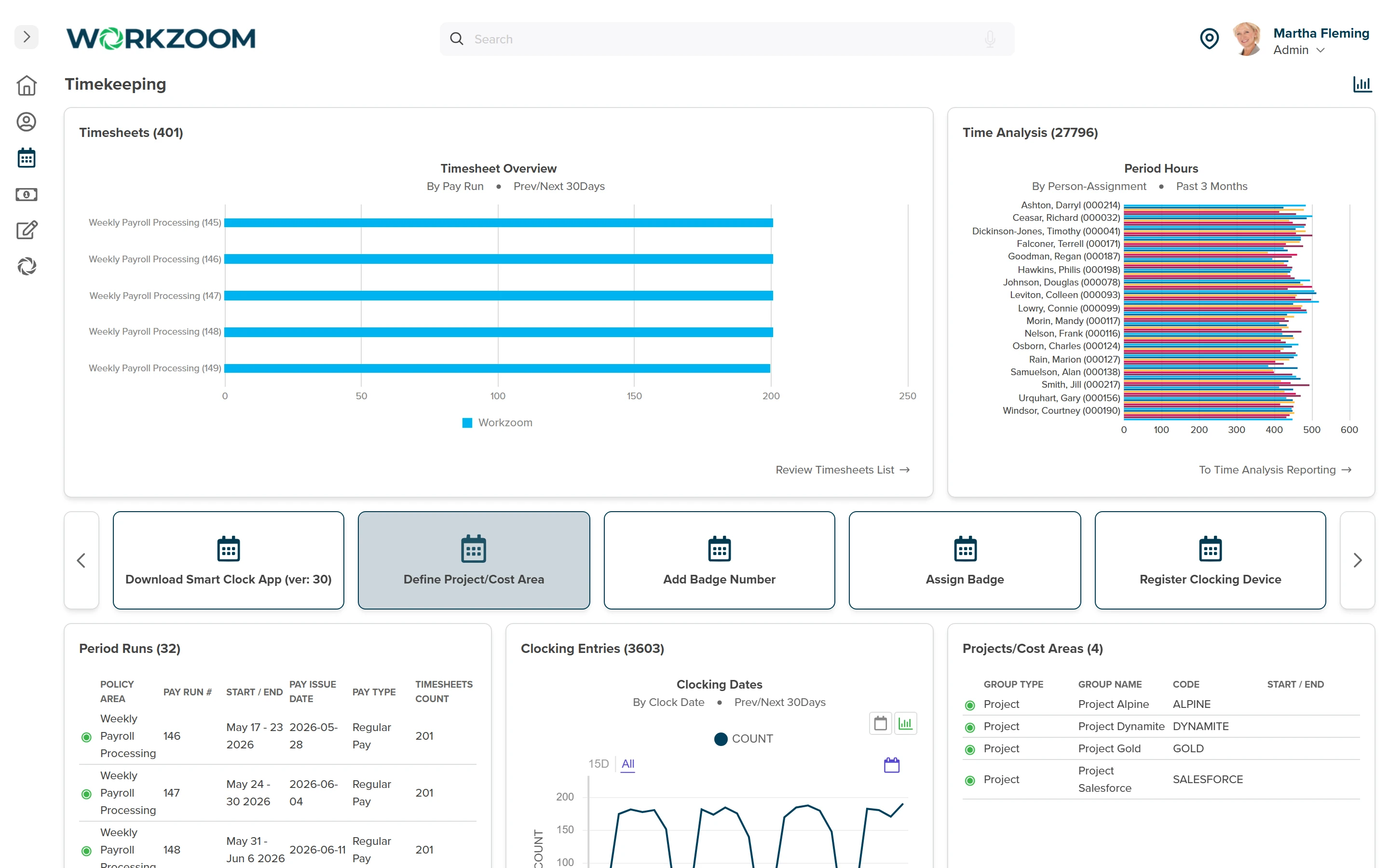
Daily Time Batches surface variances against the schedule. A manager can correct a missing punch, review extra time and add notes. On-schedule hours still need the approval required for payroll processing.
Workzoom applies configured daily, weekly and period rules to recorded time, including overtime, premiums and meal deductions.
Your team defines the policy and the employee groups it applies to; a location label does not create a legal rule.
Approved time can reach Workzoom payroll without an export between the modules. The timesheet must align with the payroll period and be approved before the Time Cut Off Date.
Late approval requires adjustment in a later cycle.
Timekeeping policy defines rounding and tolerance rules. Geo tracking records clocking location; geo fencing limits clocking to a permitted range where supported.
These controls support review, rather than guaranteeing attendance or removing the need for corrections.
Choose clocking methods for each employee group. Recorded time follows the configured review and payroll process.
See All Clocking MethodsEmployees record clock-in and clock-out from the Workzoom app.
Employees clock in and out through the configured web clock.
Badge clocking uses a kiosk-based station at the work location.
Capture clocking entries through a biometric fingerprint terminal.
Capture clocking entries through a facial recognition terminal.
Employees clock in and out from their self-service dashboard.
Employees enter time on a timesheet and submit it for manager review.
Customer stories
Read published customer stories about connected Workzoom operations. Each story’s results apply to the workflows it describes. View all case studies
Payroll runs seamlessly, and HR processes are no longer a tedious grind. It's simplified how we work, allowing us to focus more on our people.

Before Workzoom, we were buried in spreadsheets. Now HR is so much simpler. We spend less time on admin and more time supporting our staff and residents every single day.

What mattered most was choosing a solution built for businesses like ours. Workzoom delivered everything we needed, from payroll to facial recognition clocks, and worked with us every step.


We would not be able to hire the way we do with the same resources. It has kept our headcount consistent without growing it, saving us time and money every single cycle.


Workzoom completely transformed our payroll process in just one month. So easy to audit, validate, and make corrections, even at the last minute. The support we received was incredible.
Moving to Workzoom was the right move. It gave our dynamic report and payment structures the flexibility we needed, at the right price.

Switching to Workzoom made managing payroll and timekeeping so much easier. We processed our first payroll faster than we expected and now feel far more confident in everything we do.
Keep exploring
Pair Timekeeping with the rest of the Workforce Suite. One employee record, nothing to integrate or maintain.
Workzoom is $4 USD per suite per employee per month, or $16 all-in for the full platform. No initial setup fees, no long-term contract. See pricing.
Frequently asked
Get started
Walk through Timekeeping live, then get a straight answer on fit and price.
Workzoom works with organizations of 50 or more employees. See our minimums.