Canada
 United States
 Bahamas













Payroll runs seamlessly, and HR processes are no longer a tedious grind. It's simplified how we work, allowing us to focus more on our people.
Capture time at the desk, in the field, or on the floor.
4.5 stars on G2 + Capterra. 49 third-party reviews.1
26+ years in production. Since 2000.2
100% in-house support. Never farmed out.14
$4 per employee / month / suite.3
Workzoom time capture software collects punches from employees and feeds them to timekeeping for review.
It supports seven clocking methods: employee self-service clocking, the mobile app, a web clock, facial recognition, biometric fingerprint terminals, badge clocking at kiosk stations, and manual timesheet entry.
Geo-fencing on mobile and web clocking is a location control set in the timekeeping policy.
Every method writes to the same timesheet through one pipeline, with role-based permissions, approval workflow, and audit logs, so frontline and remote workers record time the same way.
Time capture feeds timekeeping for exception review and payroll with no re-entry. Workzoom time capture software is built for employers with 50 to 5,000 employees.
Our clients
Without a method that fits the work, time is recorded late, estimated, or entered by a supervisor from memory. Accuracy suffers and so does payroll.
Workzoom Time Capture offers a mobile app with GPS geo-fencing that validates the employee is at the work location. Critical for field and multi-location workforces.
Every Workzoom suite shares the same employee data, so time capture stays current with payroll, HR, workforce, and talent without an export or an integration to maintain.
Mobile punches validate the employee is within the geo-fenced work location. Critical for field and multi-location workforces.
Camera-based identification at clock-in. Deployed across multi-location operations for secure, contactless verification.
Managers record time on behalf of employees without device access, on the timesheet or in the Daily Time Batch, and the entry follows the same approval path as any other.
Desk workers use self-service or the web clock. Field workers use the mobile app, with geo-fencing set in the timekeeping policy. Warehouse and plant workers use badge clocking at kiosk stations or biometric terminals.
Multi-location operations use facial recognition. Supervisors enter time for crews without device access on the timesheet.
Every punch is captured with location data, timestamp, and identification method. GPS validates mobile punches against geo-fence boundaries. Biometric and facial recognition prevent buddy punching.
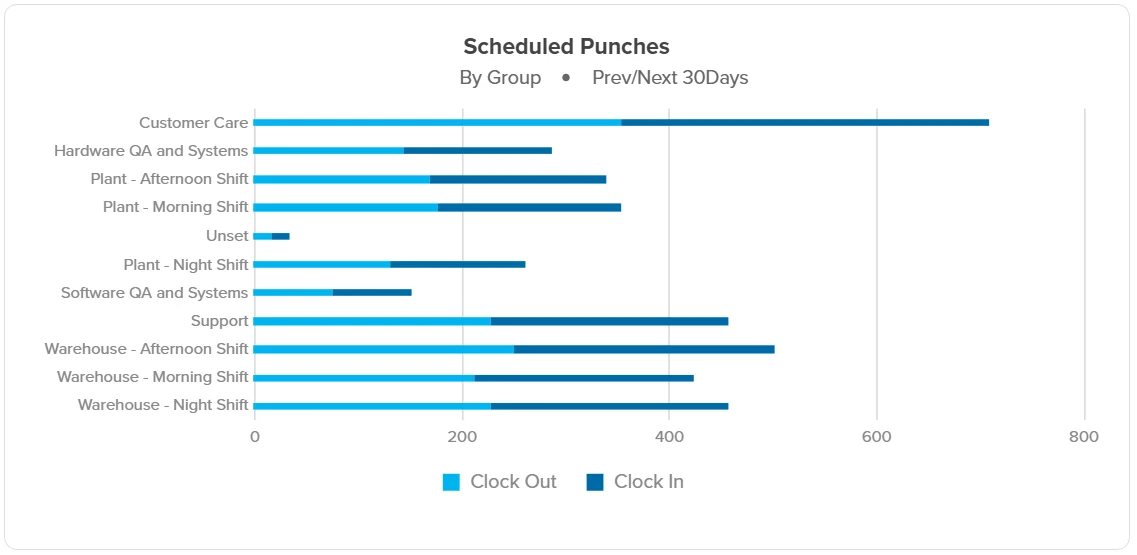
Desk, field, plant, and multi-location teams each clock in the way that fits the work. Every method writes to the same timesheet through one data pipeline.
See How Time Capture Connects to TimekeepingPunches from the Workzoom app, with geo-fencing set as a location control in the timekeeping policy.
Desk and administrative staff clock in from any browser with no extra hardware.
A shared device at the work location captures time for the whole team.
Fingerprint verification prevents shared credentials and time fraud.
Contactless camera identification deployed across multi-location operations.
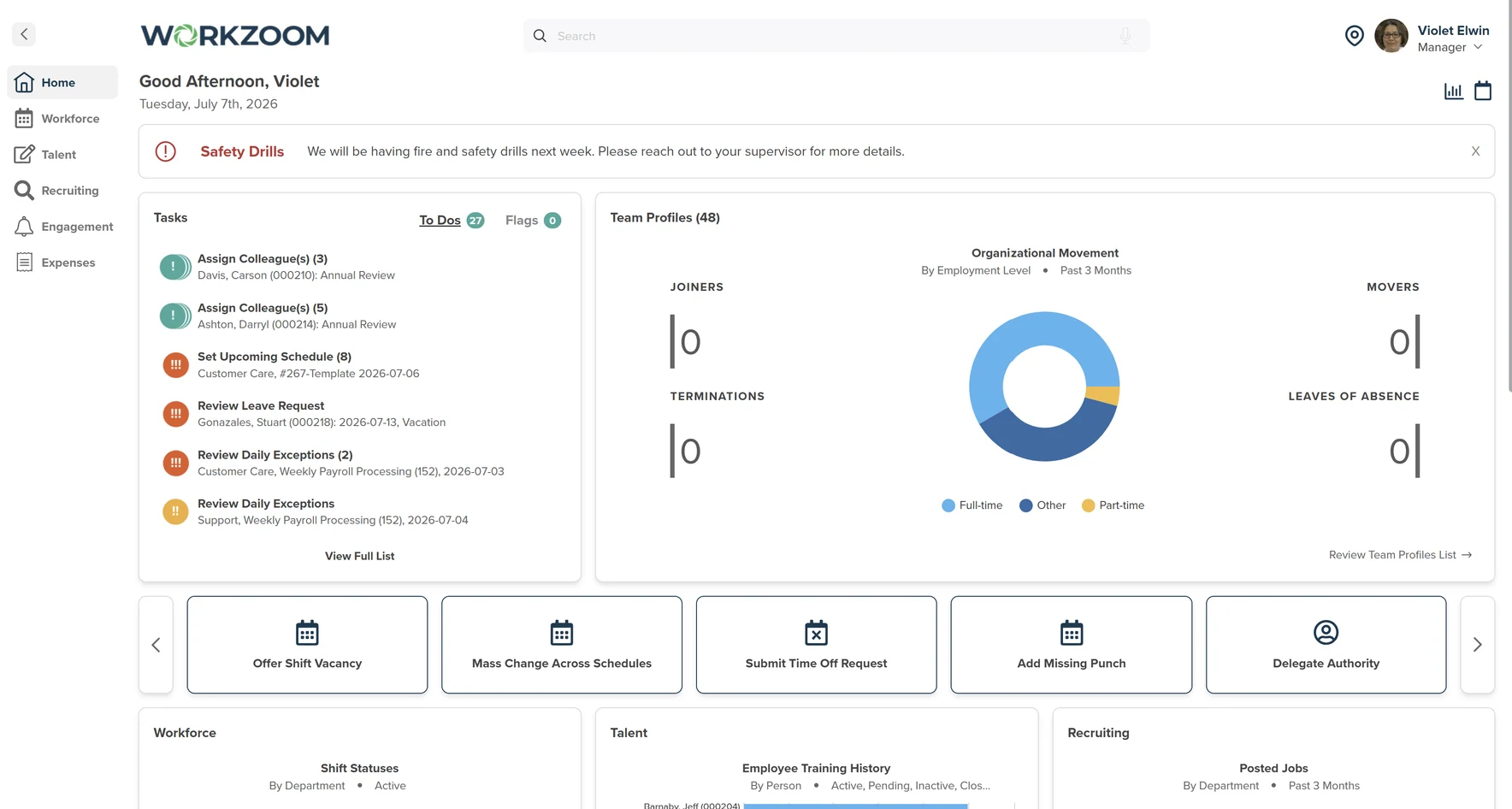
Employees clock in and out straight from the home dashboard in employee self-service.
Managers record time for workers without a device, and the entry follows the normal approval path.
Customer stories
Teams running Workzoom time capture on real payroll, real schedules, real headcount. View all case studies
Payroll runs seamlessly, and HR processes are no longer a tedious grind. It's simplified how we work, allowing us to focus more on our people.

Before Workzoom, we were buried in spreadsheets. Now HR is so much simpler. We spend less time on admin and more time supporting our staff and residents every single day.

What mattered most was choosing a solution built for businesses like ours. Workzoom delivered everything we needed, from payroll to facial recognition clocks, and worked with us every step.


We would not be able to hire the way we do with the same resources. It has kept our headcount consistent without growing it, saving us time and money every single cycle.

Workzoom completely transformed our payroll process in just one month. So easy to audit, validate, and make corrections, even at the last minute. The support we received was incredible.
Moving to Workzoom was the right move. It gave our dynamic report and payment structures the flexibility we needed, at the right price.

Switching to Workzoom made managing payroll and timekeeping so much easier. We processed our first payroll faster than we expected and now feel far more confident in everything we do.
Keep exploring
Pair Time Capture with the rest of the Workforce Suite. One employee record, nothing to integrate or maintain.
Workzoom is $4 USD per suite per employee per month, or $16 all-in for the full platform. No initial setup fees, no long-term contract. See pricing.
Frequently asked
Get started
Walk through Time Capture live, then get a straight answer on fit and price.
Workzoom works with organizations of 50 or more employees. See our minimums.