
Every file your payroll needs to send, sent from one record.

Bank deposits, journal entries, carrier files and year-end forms, all built from the same employee record and set up with you by the team that implements Workzoom.

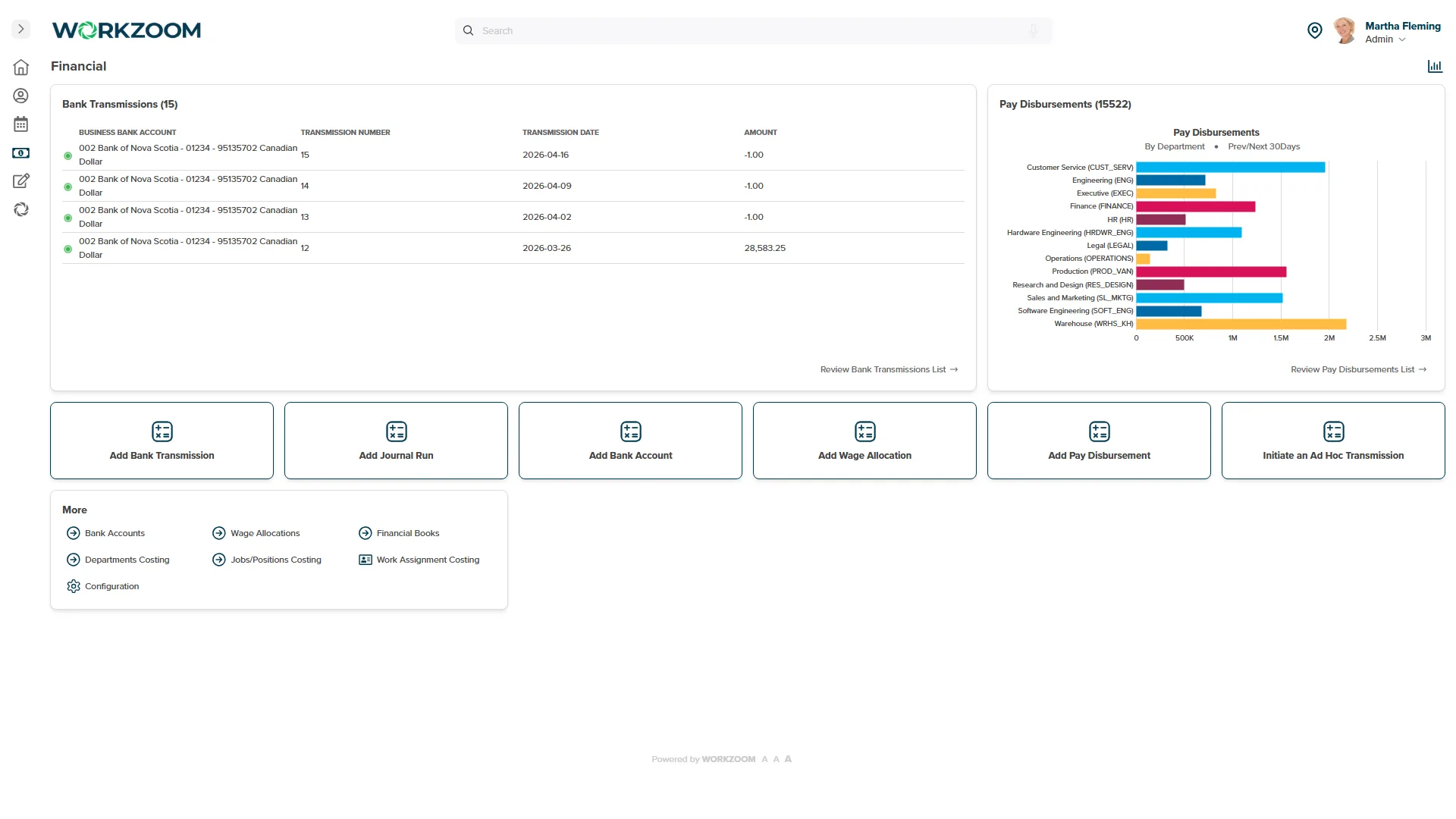
Workzoom Financial screen listing bank transmissions by business bank account, with journal runs and wage allocations one click away
Bank fileBuilt from every pay run

One record, many files.

The same numbers everywhere.
Workzoom keeps one record for each employee and builds each file from it, so the bank, the ledger and the carrier all see the same numbers.
Your formats, confirmed at setup.
Each bank, accounting system and carrier wants its file a certain way. We confirm the format and configure it during implementation, with your team.
You stay in control of what leaves.
You review and download each file, then upload it where it goes. Nothing is sent to your bank or the government without you.
One employee recordWorkzoom
Your bankDirect deposit file
Your ledgerJournal file
Benefits carriersEnrolment files
GovernmentT4, T4A and ROE
Your auditorExcel, CSV or PDF
Payroll elsewhereTime, leave and pay data

Nine kinds of file, one per job.

Bank disbursement files

Each pay run builds a CPA-compliant direct deposit file from your disbursing account. Download it and upload it to your bank. Your bank's format is confirmed during setup.

  • Built from every pay run
  • Pay splits included
  • You upload, so you stay in control
  1. HeaderWho is paying: your organization
  2. Detail linesOne line per deposit, pay splits included
  3. TrailerTotals for the whole pay run

Pay split across accounts

Employees can split their pay across bank accounts by amount or percentage, and the last account takes the rest. The deposit file reflects every split.

General ledger journal

A journal file mapped to your chart of accounts, with a reconciliation report. Clients import it into accounting systems such as Business Central and iCity.

Year-end and government forms

T4 and T4A slips, the CRA summary file, Records of Employment in the ROE Web format, remittance reports, and EHT, WSIB and pension extracts. You review and submit.

Benefits carrier files

Enrolment and change files built to each carrier's format during implementation, so carriers see the same coverage your employees do.

Data coming in

At setup we load your employee data from an Excel template. After go-live, pay batches and compensation changes upload from Excel templates. Year-to-date loads handle a mid-year switch.

Reports going out

Every report exports to Excel, CSV or PDF, ready for your auditor, your board or your own analysis.

Single sign-on

Staff sign in with Microsoft Entra ID, Okta or OneLogin through SAML 2.0.

Your payroll provider elsewhere

Outside Canada, the US and the Bahamas, Workzoom calculates to gross and exports time, leave and pay data for your provider.

Formatted for Canada's banks and the CRA.

Direct deposit files are formatted for the banks below. Year-end and Record of Employment files come out ready for your team to submit.

Direct deposit

Year-end and Records of Employment

  • Canada Revenue AgencyT4, T4A and the summary file
  • Service CanadaRecords of Employment, ROE Web format

Payday, file by file.

  1. Step 1Run and approve payrollEvery pay issue date is set when the pay is created, and it drives both files that follow.
  2. Step 2Download the bank fileUpload it to your bank as it is; opening it first can change the format.
  3. Step 3Your bank pays your peopleOn the pay date.
  4. Step 4Import the journalInto your accounting system, with the reconciliation report beside it.
  5. Step 5At year-endT4s and Records of Employment come out of the same record. You review and submit.
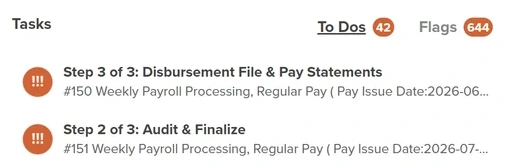
Workzoom Tasks queue showing Step 2 of 3, Audit and Finalize, and Step 3 of 3, Disbursement File and Pay Statements, for two weekly payrolls

The bank file is a step in your queue.

Each pay run arrives as tasks: audit and finalize, then the disbursement file and pay statements. Nobody has to remember where the file lives.

Straight answers, plainly.

Connects today, by file

  • Your bankDirect deposit file
  • Your ledgerJournal file with a reconciliation report
  • Benefits carriersEnrolment and change files
  • CRA and Service CanadaT4, T4A and ROE Web files
  • Sign-inSingle sign-on through SAML 2.0
  • Your spreadsheetsExcel imports in; Excel, CSV and PDF out

Not yet, and what you do instead

  • Developer accessEvery connection is a file today. Developers cannot call Workzoom directly yet.
  • Live business intelligenceNo live connector. Reports export to Excel and CSV.
  • Filing for youWorkzoom prepares the files. You upload and submit, so nothing leaves without your sign-off.
  • Job board postingOpenings publish to your branded careers page. Posting to job boards is manual.

Workzoom integrations: common questions.

Workzoom builds a CPA-compliant direct deposit file in Canada. Each bank's exact format is confirmed and configured during implementation, so bring your bank's file specification to setup.

Workzoom builds a journal file mapped to your chart of accounts. Your team imports it, with the reconciliation report to check it.

Workzoom generates them, including the CRA summary file and ROE Web files. Your team reviews and submits them.

Yes. Our implementation team loads it from an Excel template, and year-to-date loads handle a mid-year switch.

Send us the list of systems you run today.

In 20 minutes we will show you which files Workzoom sends, how, and what your team does on payday. For organizations with 50 or more employees. See our minimums.

Loading available times.

Better work, in your inbox.

Fresh ideas for HR and payroll. Every week.

Better work, in your inbox.

Practical ideas for HR, payroll and workforce teams.