
Leave management that replaces the spreadsheet
Formal leave policies. Automated accruals. Real-time balances. Approval workflows that route to the right manager. All connected to scheduling, timekeeping, and payroll.
The real problem
Why most leave tracking falls apart at scale
Leave requests live in email threads and shared spreadsheets. Every absence is a fire drill.
No formal workflow. Requests get lost. Approvals depend on whoever checks their inbox first. HR spends hours reconciling what was approved versus what was actually taken.
Nobody knows their real balance until HR runs the numbers. Employees ask. Managers guess.
Accruals are calculated manually. Carryover rules live in someone's head. Employees submit requests without knowing if they have days left. HR becomes the help desk.
Managers approve blindly without seeing who else is already off. Coverage gaps happen weekly.
No team calendar. No blackout dates. No coverage thresholds. One person approves vacation while another already approved the same week for three people on the same team.
From policy to payroll in four steps
Define your leave rules once. Workzoom handles accruals, requests, approvals, and payroll deductions from there.
Define leave policies
Set up leave types, accrual rules, carry-over limits, and waiting periods. Each policy follows its own formula. Your implementation coach works with you to configure everything.
Employees request time off
Self-serve from desktop or mobile. Employees see their real-time balance, pick dates, and submit. No paper forms, no email chains, no spreadsheet lookups.
Managers approve with context
Before approving, managers see the team calendar and coverage view. They know who else is off that week. Requests route based on your org structure.
Payroll receives automatically
Approved leave creates the correct deduction codes for the next pay run. No export, no import, no reconciliation. The data is already there.
Your coach works with you to configure every policy
Configuration is included. No professional services fees. By go-live, you manage leave independently.
How Workzoom leave management works, from request to payroll
One record flows from request to Scheduling, Timekeeping, and Payroll. Zero re-entry.
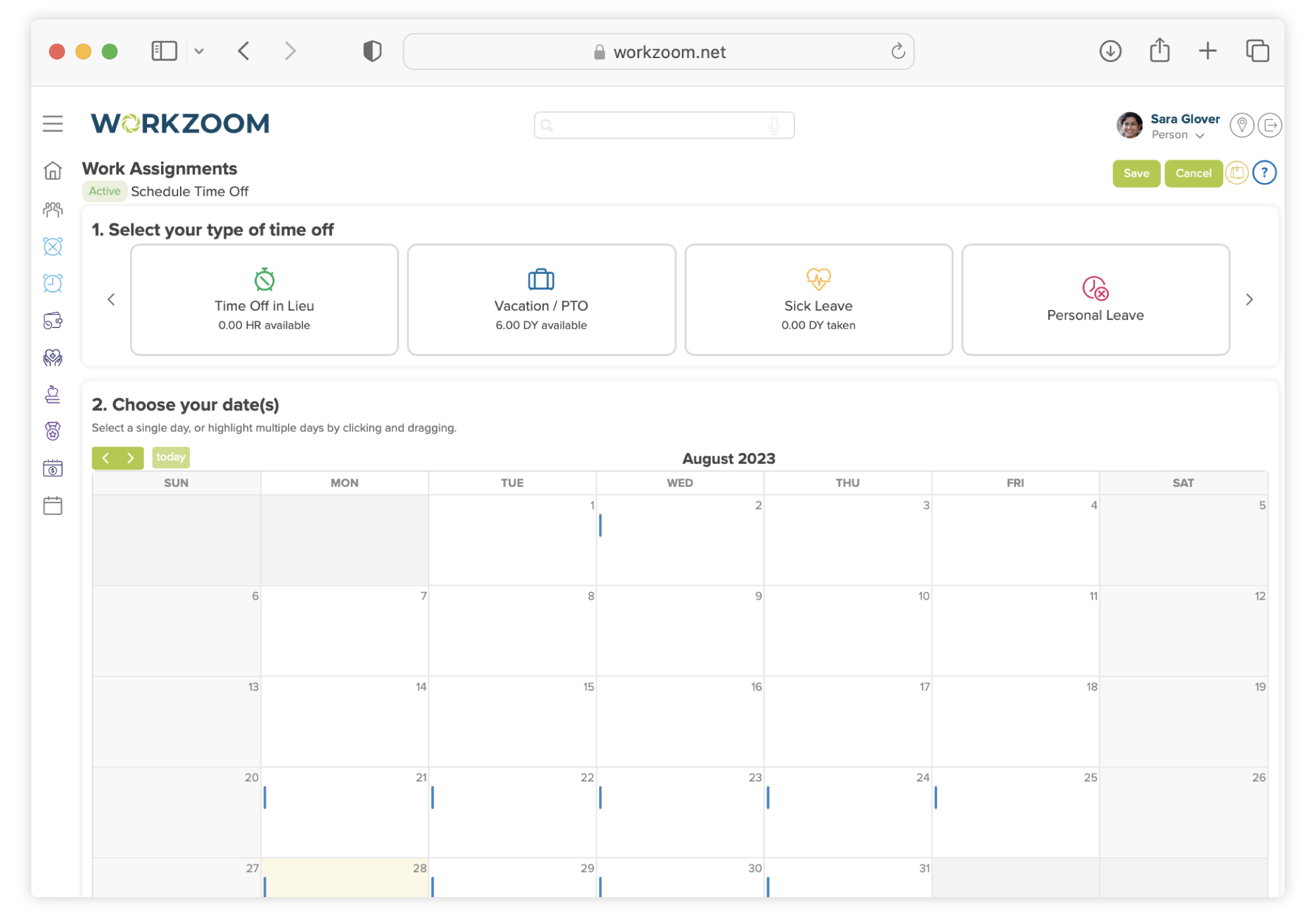
Submit from any device, routes to the right manager
Employees pick dates, select a leave type, add notes, and submit. The request routes to their direct manager automatically based on org structure. No email chains. No spreadsheet updates.
- Mobile-friendly submission from any device
- Leave type selection with balance visibility
- Auto-routing based on org structure
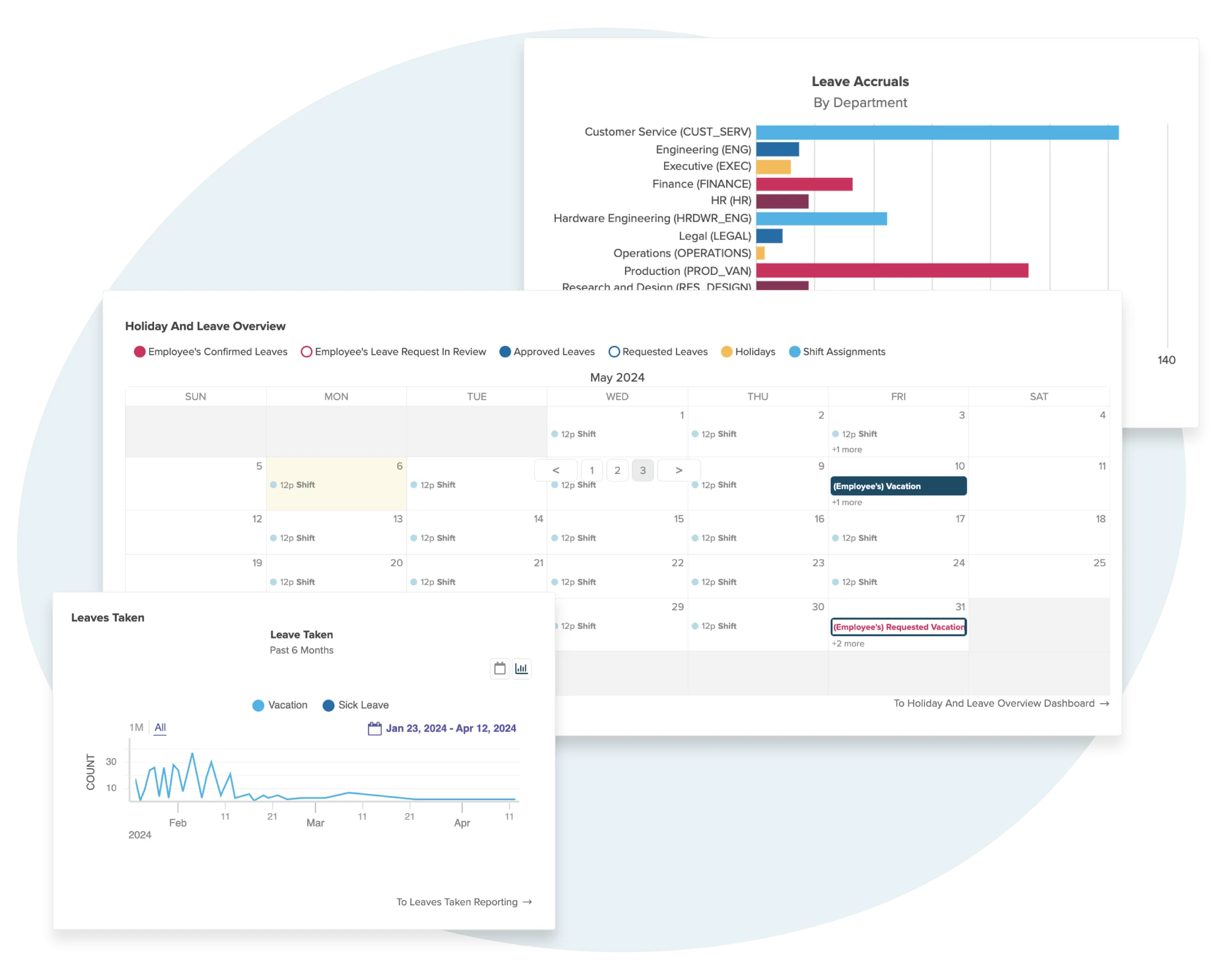
Approve with full team context, not guesswork
Managers see the team calendar, existing coverage, and the employee's balance before deciding. One tap to approve. One tap to decline with a reason. No more checking spreadsheets or asking HR.
- Team calendar shows who else is already off
- Coverage thresholds prevent understaffing
- One-tap approval or decline with reason
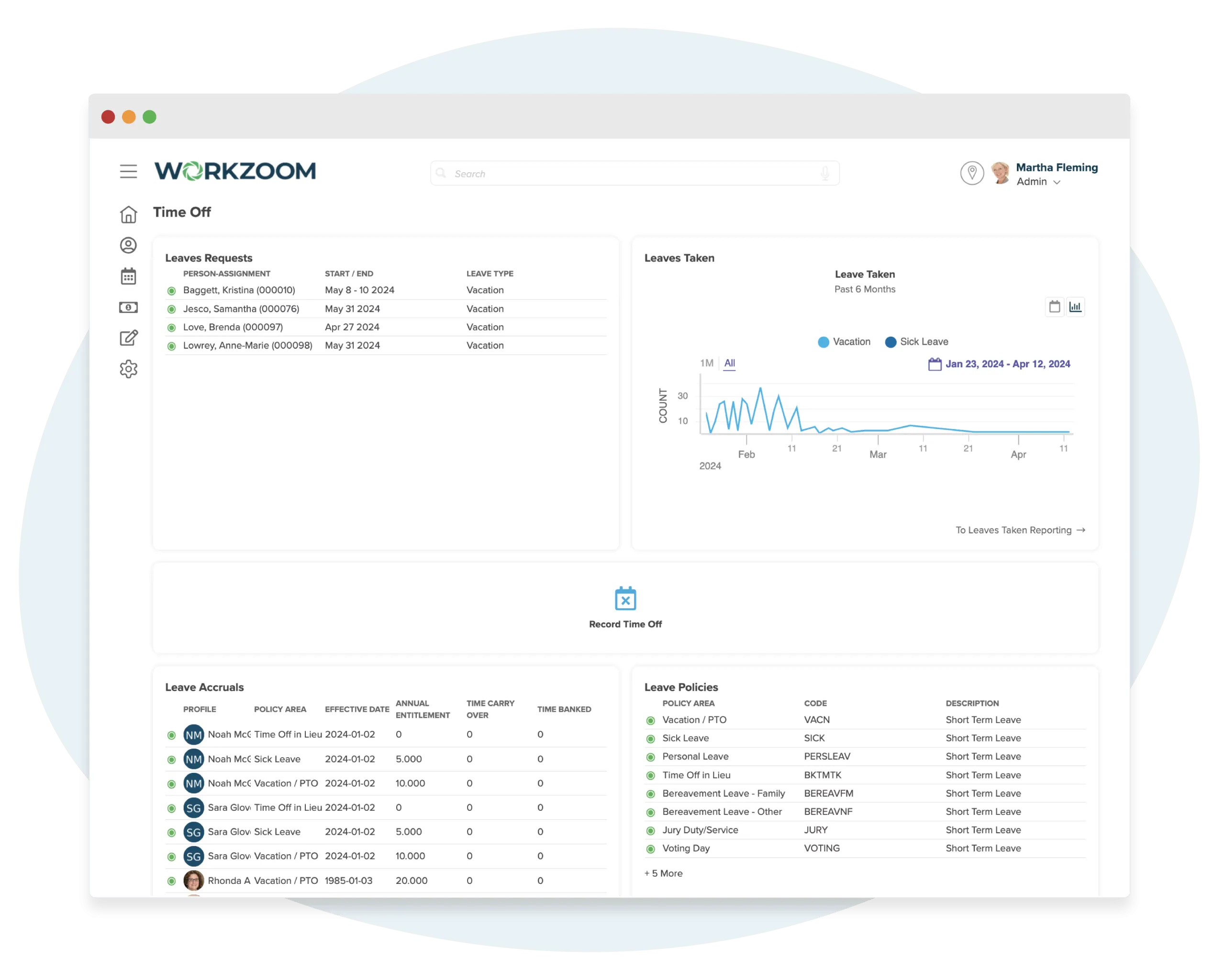
Balances calculate themselves based on your rules
Define accrual rules once. Workzoom applies them automatically based on tenure, hire date, role, and location. Carryover, caps, and proration are all handled. Employees always see their current balance.
- Tenure-based accrual rates with automatic tier changes
- Automatic carryover with configurable caps
- Pro-rated balances for mid-year hires
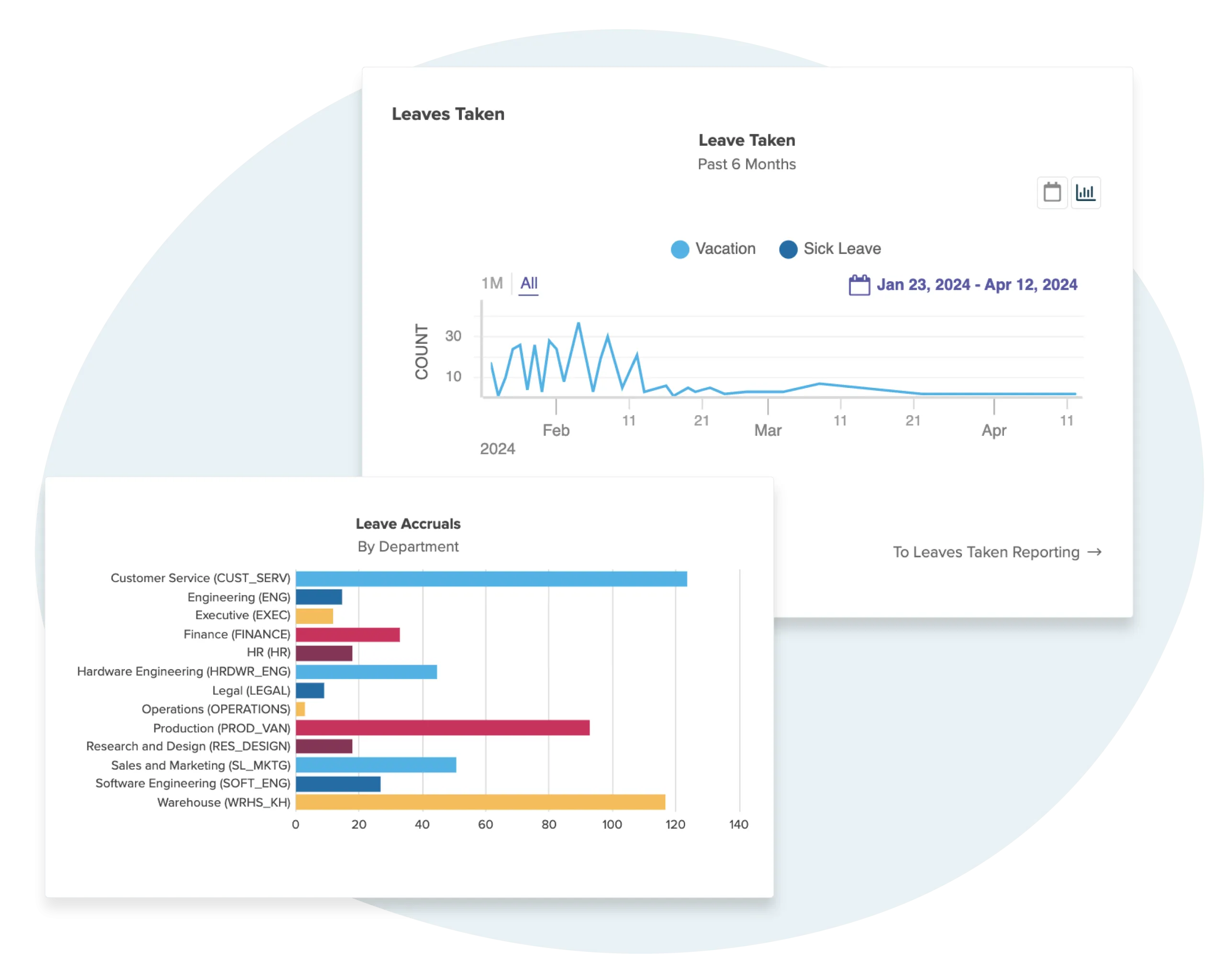
Approved leave flows to payroll without re-entry
Approved leave creates payroll deductions automatically. Sick days, vacation, personal days. All categorized and calculated correctly for the next pay run. One system. One record.
- Automatic deduction codes mapped to leave types
- Direct integration with the next pay run
- Zero manual re-entry from time off to payroll
High Performer Across Every Core Function
Independently verified. Consistently rated. Built for mid-market teams.
 Core HR
 Payroll
 Workforce
 Time Tracking
 Capterra
 Software Advice
Submit once, and the approved leave updates scheduling, timekeeping, and payroll automatically
No exports, no imports, no middleware. Your implementation coach works with your team to configure your leave policies and accrual rules, then teaches you how everything works.
One database from the ground up. Nothing to integrate.
Every module reads and writes to the same employee record. A leave request submitted by an employee flows through manager approval, updates the schedule, adjusts the timesheet, and creates the right payroll deduction. There's no middleware to maintain, no sync to troubleshoot, and no data to reconcile between systems.
Request leave from anywhere
Employees see real-time balances, pick dates, and submit. The request routes to the right manager based on your org structure.
SchedulingTimesheets adjust automatically
Approved leave updates timesheets instantly. The timekeeper sees the absence reason already categorized. No codes to remember.
TimekeepingAccruals calculate in real time
Each leave type follows its own formula. Carry-over limits, waiting periods, and prorated balances are enforced automatically.
Employee profileLeave flows straight to payroll
Approved absences create the correct deduction codes for the next pay run. No manual entry, no month-end reconciliation.
Pay processingYour implementation coach works with your team to configure your policies, accrual rules, and approval chains, then teaches you how it all works
Configuration is included, no professional services fees. By go-live, you'll manage leave requests, balance lookups, and payroll deductions independently.
Where 400 employees now submit leave requests, check balances, and get approvals through self-serve access.
Senior care staff across
Alberta managing their own leave
Phone calls to HR for
balance checks or approvals
Silvera for Seniors, Alberta
Managing leave across 36 locations used to mean phone calls to HR for every balance check and paper forms for every request. Now employees handle it themselves, and every approved day flows to payroll automatically.
When an employee submits a leave request, the balance check, manager routing, and payroll deduction happen in one system. See how leave reaches payroll.
Workzoom vs BambooHR and Dayforce
Standalone tools charge per-module for leave. Enterprise platforms bundle it into long contracts. Workzoom includes it in every Workforce suite license.
Comparison based on publicly available information as of March 2026. Features may vary by plan tier.
What clients say
Workzoom completely transformed our payroll process in just one month. So easy to audit, validate, and make corrections, even at the last minute. The support we received was incredible.
Payroll runs seamlessly, and HR is no longer a tedious grind. It simplified how we work, letting us focus more on our people. A complete game-changer for our entire team.

Before Workzoom, we were buried in spreadsheets. Now HR is so much simpler. We spend less time on admin and more time supporting our staff and residents every single day.

What mattered most was choosing a solution built for businesses like ours. Workzoom delivered everything we needed, from payroll to facial recognition clocks, and worked with us every step.

Switching to Workzoom made managing payroll and timekeeping so much easier. We processed our first payroll faster than we expected and now feel far more confident in everything we do.
Workzoom has offered us more than just tools. It has empowered us to excel in our field. This upgrade gives us more time to focus on team and community projects.

Moving to Workzoom was the right move. It gave our dynamic report and payment structures the flexibility we needed, at the right price.

We would not be able to hire the way we do with the same resources. It has kept our headcount consistent without growing it, saving us time and money every single cycle.

See how one request flows from submission to payroll
Pick a time. We walk through the request-to-payroll workflow that eliminates spreadsheets and manual tracking.
Tailored to your team size
See the product first
Full suite, no contracts
Dedicated coach, no fees
Time Off connects to Scheduling, Timekeeping, Payroll, and Personnel across the full Workzoom platform.
Leave management questions, answered
Leave management software automates the process of requesting, approving, and tracking employee time off. It replaces spreadsheets and paper forms with self-serve access where employees see their balance, submit requests, and managers approve from the same system. Approved leave flows directly to payroll without re-entry.
Workzoom supports unlimited leave types: vacation, sick, personal, bereavement, jury duty, and any custom category your policy requires. Each type has its own accrual formula, carry-over rules, and approval chain. You define the policy once during implementation. The system enforces it automatically.
Yes. Employees see their current balance for every leave type in real time from desktop or mobile. The balance updates with each approved request and each accrual cycle. No phone calls, no emails, no waiting for HR to look it up.
Accruals run automatically based on the rules you define: per pay period, annual grant, or prorated for mid-year hires. Carry-over limits, waiting periods for new employees, and minimum balance rules are all enforced without manual calculation. Employees see their updated balance after each cycle.
Yes. Because time off and payroll share the same database, approved leave creates the correct deduction codes for the next pay run. Vacation pay, sick leave, personal days. All categorized correctly and deducted from the right bank without manual entry or reconciliation.
Yes. The team calendar shows all approved and pending leave for the manager's direct reports. Blackout dates can be configured for peak periods. Managers see coverage gaps before they approve, preventing scheduling conflicts.
Workzoom's leave management is part of the Workforce suite, which typically takes 2 to 4 weeks to implement. Your dedicated implementation coach works with your team to configure leave policies, accrual rules, and approval chains. Configuration is included in the subscription. No professional services fees.
4 per employee per month for the full Workforce suite, which includes time off, scheduling, clocking, and timekeeping. No per-module pricing. No setup fees. No long-term contracts. A 200-employee company pays 800/month for the complete Workforce suite.
More from Workforce.
View all WorkforceScheduling
Build schedules that already account for approved leave. When an employee's time off is approved, the shift calendar reflects the absence without manual editing.
Explore SchedulingClocking
Track actual hours worked alongside approved leave. Clock punches and absence records feed into the same timesheet, giving you the full attendance picture.
Explore ClockingTimekeeping
Approved leave automatically adjusts timesheets. No manual exceptions to enter. Absence categories are already applied when the timekeeper reviews the period.
Explore TimekeepingPay Processing
Leave deductions flow directly to payroll. Vacation pay, sick leave, personal days. All categorized and calculated for the next pay run without re-entry.
Explore Pay Processing