
Employee timekeeping software that captures every hour and feeds it to payroll with the rules already applied
Capture work hours through 7 built-in clocking methods including biometric, mobile GPS, and web punch. Daily, weekly, and shift premium rules are applied automatically, and approved time flows directly to payroll without exports or manual entry. Because timekeeping lives inside the same platform as scheduling and employee records, every hour is compared to the plan.
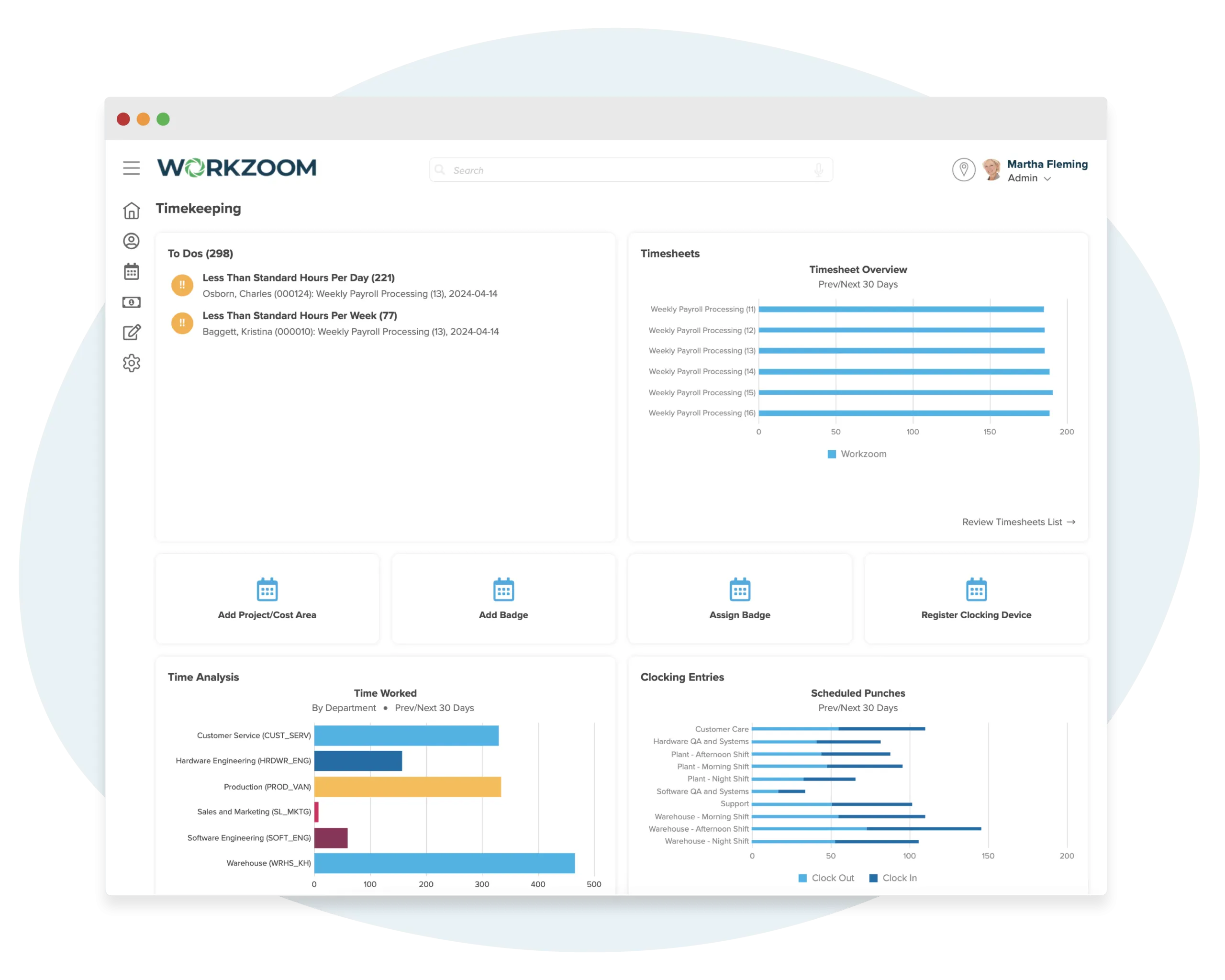
The real problem
You're tracking hours in a system that can't see the schedule or the pay run
Hours are collected, but nobody knows if they match what was scheduled.
Employees clock in and out. The timesheet fills up. But there's no automatic comparison to what was actually planned. Did they arrive late? Leave early? Work a shift they weren't assigned to? You won't know until someone manually lines up the schedule with the timesheet, and most weeks nobody does.
Supervisors chase missing timesheets instead of reviewing them.
Every pay period, the same thing happens. A handful of employees haven't submitted their time. The supervisor sends reminders. Some come in at the last minute. Some don't come in at all. The supervisor approves what they have and estimates the rest. Payroll runs on incomplete data.
Overtime shows up in the pay run, not while there's still time to prevent it.
An employee works 44 hours this week. The overtime premium doesn't surface until payroll processes the timesheet. By then it's done. The hours were worked, the cost is locked in, and nobody had a chance to adjust the schedule mid-week to keep it under the threshold.
Capture time. Apply the rules. Feed it to payroll.
The schedule sets the plan. Timekeeping captures what actually happened. Payroll processes the approved result. One pipeline, no exports.
Apply daily, weekly, and premium time rules automatically
Record work hours, breaks, and overtime while the system enforces pay requirements and break regulations automatically. Define rules for how time is accounted on a daily, weekly, or pay period basis. Shift premiums based on time of day are calculated without manual input. Every timesheet is compared to the schedule so variances are flagged before they reach payroll.
- Daily, weekly, and period-based accounting rules applied automatically
- Shift premium calculations for afternoon, night, and custom differentials
- Actual hours compared to scheduled shifts in real time
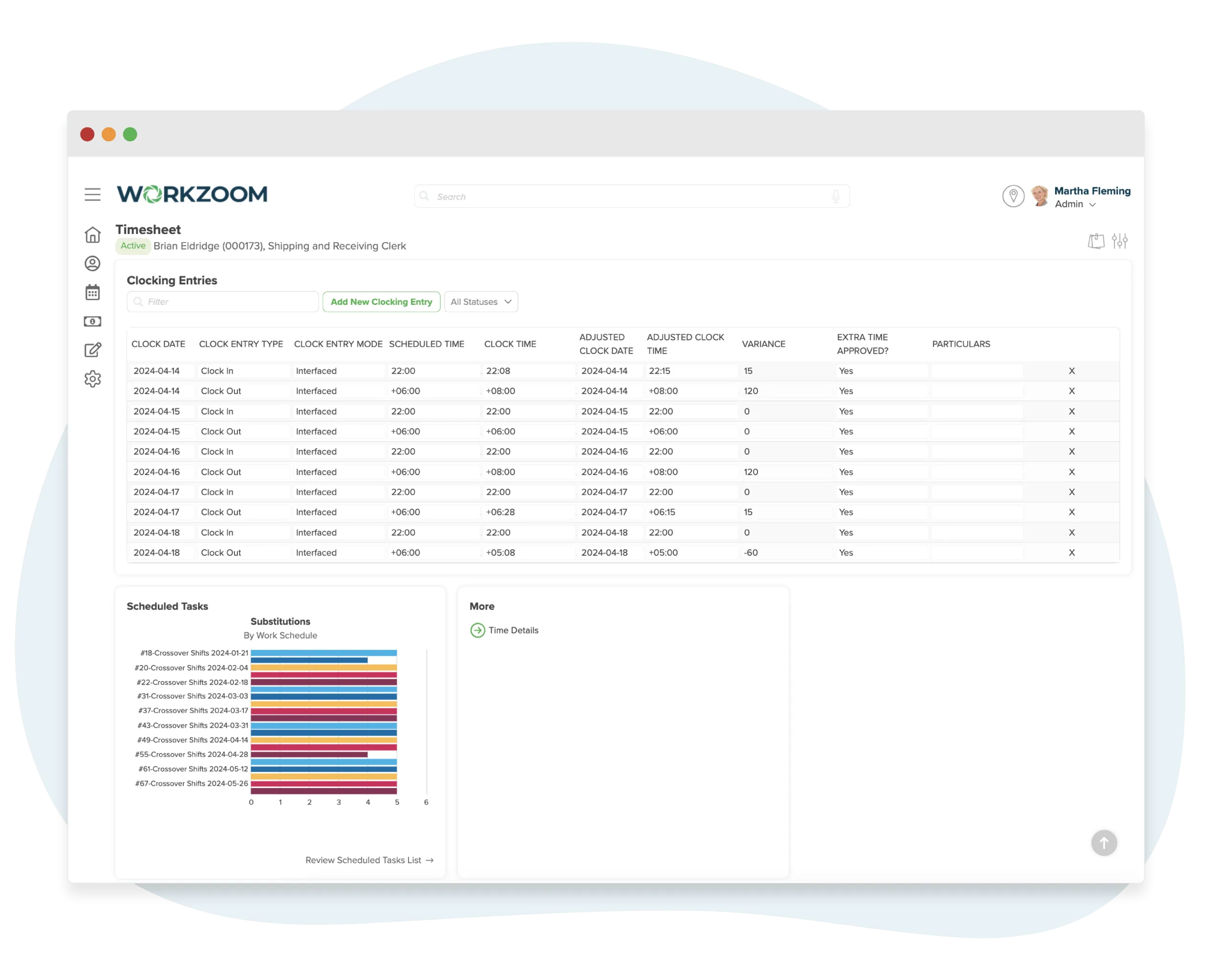
Give employees simple tools to submit and approve time
Employees submit timesheets manually or work from editable timesheets the system creates for them automatically. Multiple layouts support time by type, project, job, or task with start/end times or total hours. Supervisors review and approve before anything reaches payroll. Geo-fencing through mobile clocking ensures employees are where they need to be.
- Multiple timesheet layouts by time type, project, job, or task
- Geo-fenced mobile clocking for location-verified punches
- Supervisor review and approval before time reaches payroll
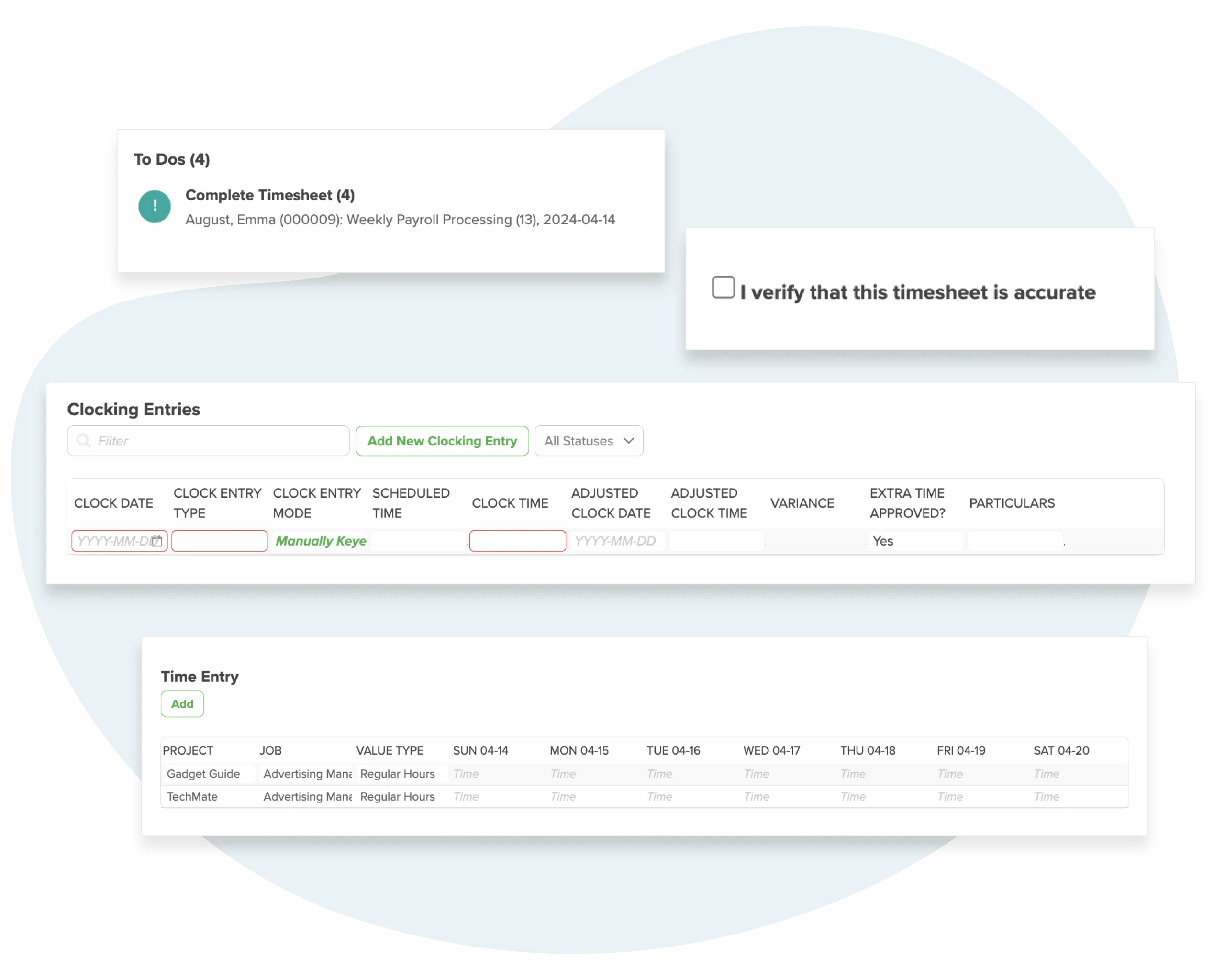
Connect clock punches, timesheets, and payroll in one system
Define rules for how clock punches are handled: rounding intervals, early and late thresholds, minimum time between punches, and what qualifies as clocking in early versus starting a new shift. Timesheets populate automatically from clock punches, staff schedules, or approved leaves. Approved time flows directly to payroll with no export step.
- Clock punch rules for rounding, thresholds, and intervals
- Timesheets populated from punches, schedules, or approved leaves
- Approved hours feed directly to payroll with no CSV or middleware
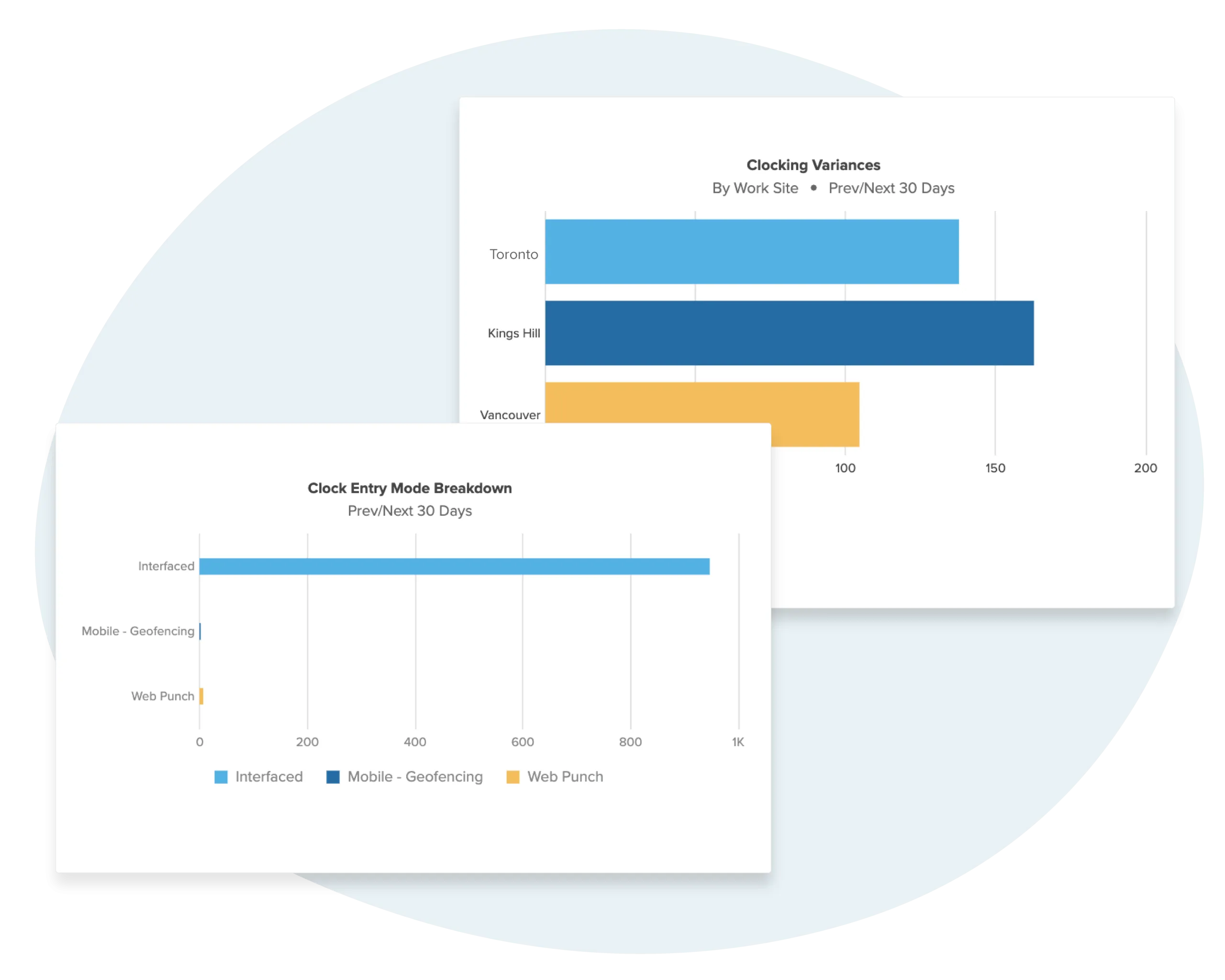
Time Clocking
One platform.
7 ways to clock in.
Capture time accurately for every team, from remote workers to the shop floor. Free mobile options included with every plan.
Compare MethodsMobile App
iOS & Android
Biometric
Fingerprint & Facial
GPS Geo-fencing
Location Verified
Kiosk Mode
Shared Devices
Timekeeping that knows what was planned and what it costs
Every hour captured is compared to the schedule, checked against your time rules, and routed through approval before it reaches payroll. One pipeline, no handoffs.
Timekeeping that knows the schedule, the rules, and the payroll destination.
Standalone trackers capture hours in isolation. Workzoom captures them with full context: who the employee is, what they were scheduled for, which rules apply, and where approved time goes.
Timekeeping with full employee context
-
7 clocking methods built in. Biometric, mobile GPS, web punch, kiosk, proximity cards, and manual entry. Free mobile options included with every plan
-
Daily, weekly, and premium rules applied automatically. Overtime, shift differentials, and period-based calculations run before time reaches payroll
-
Actual hours compared to scheduled shifts. Variances flagged automatically because scheduling and timekeeping live in the same system
-
Approved time feeds directly to payroll. No CSV export, no integration middleware, no manual data entry between systems
-
Clock punch rules handle the messy details. Rounding, thresholds, early/late logic, and minimum intervals applied automatically to every punch
-
$4/employee/month for the full Workforce suite. Timekeeping, scheduling, time off, and all 7 clocking methods included. No per-feature add-ons
Time captured in isolation
-
Software-only clocking. No biometric terminals, no proximity cards, no hardware options for on-site workforces
-
No rule engine. Daily accounting, shift premiums, and period-based calculations are done manually or in a separate payroll system
-
No schedule to compare against. Cannot flag early arrivals, late departures, or missed shifts because there is no scheduling module
-
Requires payroll integration. Data exported via CSV or synced through middleware that breaks, lags, or duplicates entries
-
Raw punches with basic rounding at best. No configurable thresholds, no early-versus-new-shift logic, no interval rules
-
$5-12/user/month for time tracking alone. Scheduling, payroll, and HR cost extra from separate vendors
No setup fees. No long-term contracts.
How we get your time and attendance up and running.
Your implementation coach sets up your time rules, configures clocking for each employee group, builds timesheets for the people who need them, and connects everything to scheduling and payroll so approved hours flow straight through to pay processing.
Define Your Time Rules
This is where you tell the system how your company accounts for time. Overtime thresholds on a daily, weekly, or custom period basis. Shift premiums for specific times of day, like an afternoon differential or a night rate. Mandatory break requirements and rounding rules for clock-ins. These rules apply automatically to every hour that comes in, so payroll never has to calculate anything after the fact.
Set Up Timesheets for the People Who Need Them
Not everyone fills out a timesheet. Salaried employees just work their hours. If they work overtime, they submit it for approval. Hourly employees who aren't clocking in get a timesheet layout that fits how they track time: by project, by job code, start and end times, or total hours. You set the submission frequency to match your pay period, and timesheets route to the right supervisor for approval automatically.
Configure Clocking for Your Teams
Clocking is assigned by employee group. Field crews get the mobile app with GPS geo-fencing. The shop floor gets a kiosk or biometric terminal. Office staff use the web browser. Your coach sets the geo-fence boundaries and any device restrictions, then daily exceptions (missed punches, early outs, unscheduled overtime) get flagged so supervisors can review them quickly instead of scanning every timesheet line by line.
Enroll Biometrics and Connect to Payroll
If you're using biometric terminals, fingerprints are uploaded one employee at a time during enrollment. For facial recognition, you upload a photo folder with proper naming conventions and the system matches faces to employee records. Once clocking is live, every hour captured compares against the scheduled shift in real time. Approved time flows into payroll with overtime and premiums already calculated. No exports, no reconciliation.
See how timekeeping actually works.
Pick a time and we'll walk through your setup together. Time rules, clocking methods, timesheet approvals, and how every approved hour flows straight into payroll with no exports or reconciliation.
Timekeeping connects to Scheduling, Clocking, Time Off, Payroll, and Organization across the full Workzoom platform.
Common questions about employee timekeeping software.
More from Workforce.
View all WorkforceScheduling
Where the plan is set. The schedule defines who should be working, when, and for how long. Timekeeping captures what actually happened and compares it to that plan.
See how the plan gets builtTime Off
Where approved leave becomes timesheet entries. When time off is approved, it populates the timesheet automatically so there is nothing for the employee to submit or the supervisor to chase.
See how leave populates timesheetsClocking
How hours get captured at the source. Biometric terminals, mobile GPS, web punch, and proximity cards all feed clock punches into the timesheet where your rules clean and standardize them.
See all 7 clocking methods