
United States HR & Payroll that actually works together.
Complete United States HR & Payroll software with multi-state tax compliance, automated W-2 generation, ACA reporting, and FLSA overtime tracking. One unified platform for all 50 states, without the enterprise price tag or integration headaches.

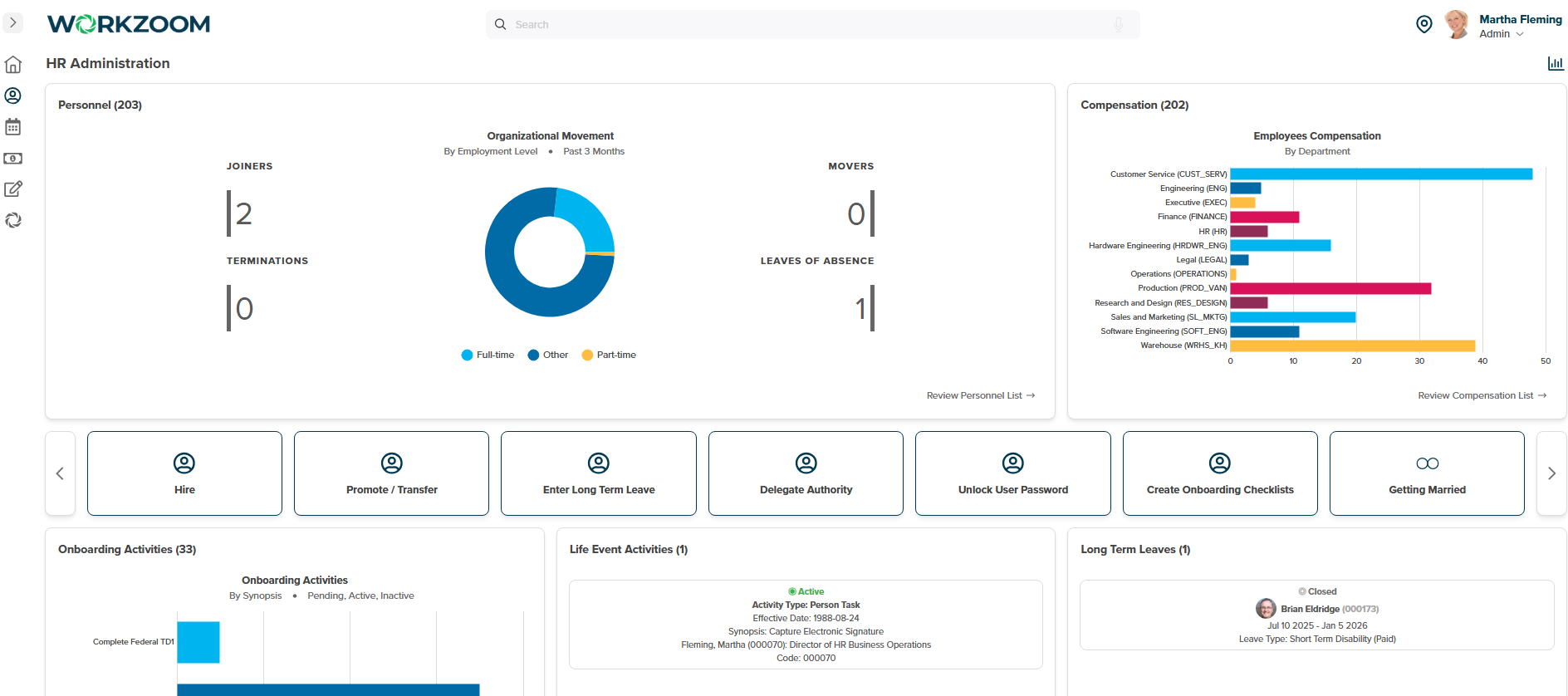
United States HR & Payroll software built for American employers. Workzoom consolidates your HR tech stack with unified employee records, automated multi-state tax withholding, federal form filing (W-2, W-4, 1099, I-9), ACA compliance tracking, benefits administration, time and attendance, and performance management—all in one system for businesses across all 50 states.
One employee record. Every location, every state, every department.
Stop syncing data between systems. Employment history, documents, org charts, and compliance records live in one place. When someone transfers from your Texas office to California, their record moves with them.
- I-9 verification with electronic signature and storage
- Multi-state employee records with location-specific fields
- EEO-1 data collection for federal reporting
- Document management with automated reminders
Audit-ready employment records
Complete employment history for every employee. When the DOL or a state agency calls, pull the documentation in seconds—not days.

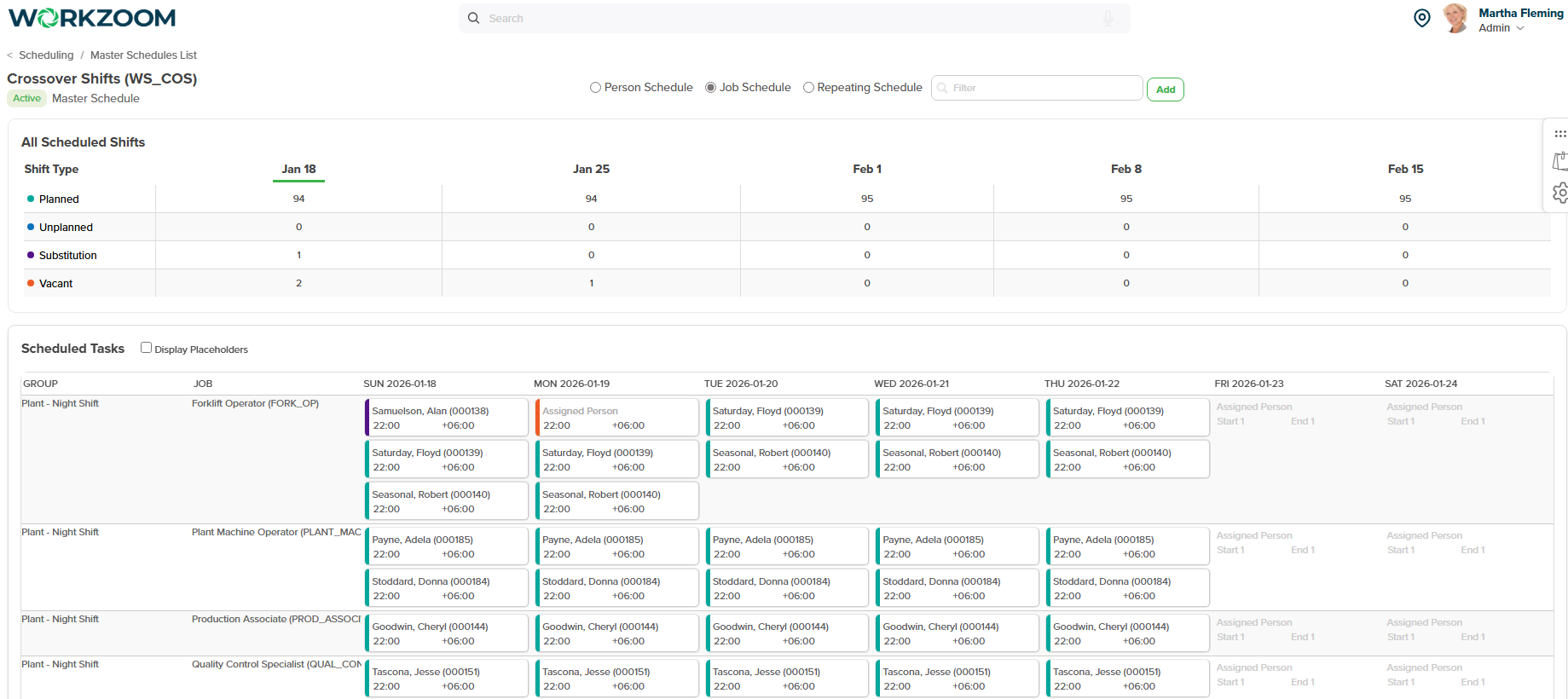
Know who's working, where, and whether you're compliant
Build schedules that account for overtime thresholds. Track time from any device. Get alerts before someone hits 40 hours—not after payroll runs. FLSA rules enforced automatically.
- Overtime tracking with pre-40-hour alerts
- State meal and rest break compliance
- Time clocking via web, mobile, or biometric terminals
- Geofencing for field and remote workers
FLSA classification built in
Exempt vs. non-exempt tracked at the employee level. Overtime calculated correctly. Salary thresholds monitored against federal and state minimums.

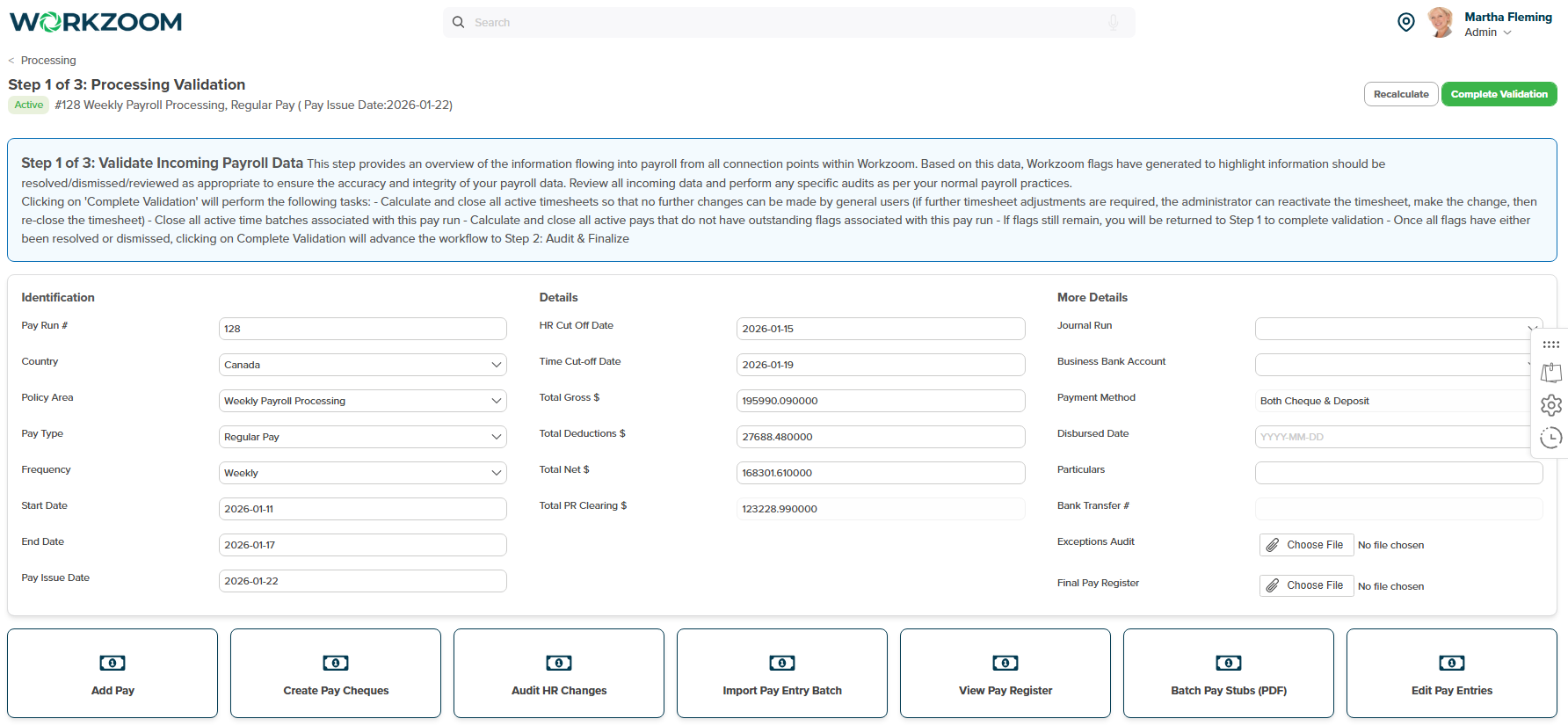
50 states. One payroll run. Every tax handled.
Hours flow in from timekeeping. Federal, state, and local taxes calculate automatically. Review, approve, and we handle the rest: direct deposits, tax filings, W-2s, and quarterly returns.
- Federal withholding with automatic W-4 updates
- State income tax for all 50 states
- Local and city taxes where required
- Quarterly 941s and annual W-2s filed for you
Multi-state complexity, handled
Employee lives in New Jersey, works in New York? We calculate both state withholdings and handle the reciprocity. No manual overrides needed.

Performance reviews that actually connect to everything else
Goals, reviews, and development plans tied to the same employee record as payroll and HR. Track certifications. Run review cycles. Build succession plans with real data—not another disconnected system.
- Configurable review cycles (annual, quarterly, continuous)
- Goal tracking with OKR or traditional frameworks
- Required training tracking (harassment, safety, OSHA)
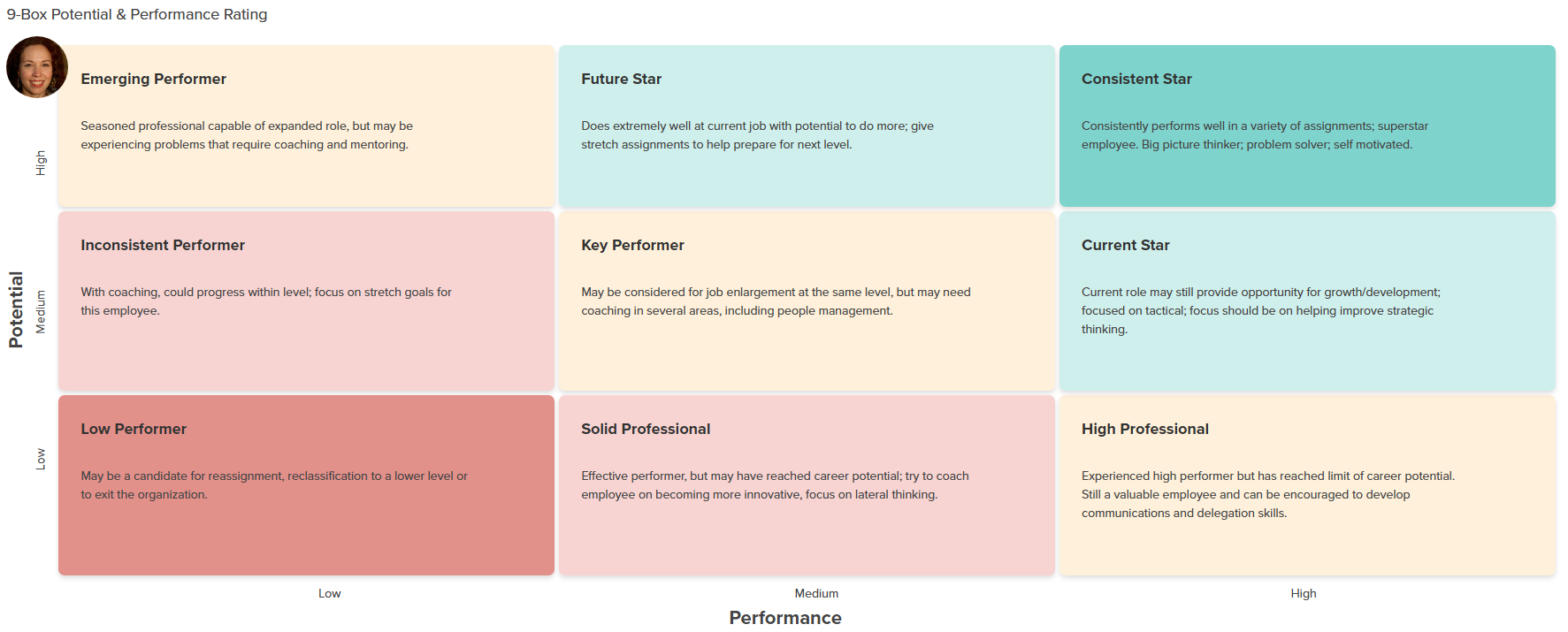
- 9-box talent grids for succession planning
Compliance training tracked
Sexual harassment training. Safety certifications. State-mandated requirements. Track completion, send reminders, document everything.

Federal and state compliance built in. Not bolted on.
Most HR systems make you configure tax rules and compliance settings yourself. Workzoom handles the complexity so you can focus on running your business.
50-state payroll tax
Federal income tax, Social Security, Medicare, plus state income tax for all 50 states. Local taxes where required. Rates update automatically.
- FICA (Social Security + Medicare)
- FUTA + state unemployment (SUI)
- State income tax reciprocity
W-2 and 1099 filing
Year-end forms generated automatically from your payroll data. Electronic filing to SSA and state agencies. Copies delivered to employees.
- W-2 for employees, 1099-NEC for contractors
- Electronic filing included
- State W-2s where required
FLSA overtime rules
Non-exempt employees tracked against 40-hour thresholds. Overtime calculated at 1.5x. Salary thresholds monitored against DOL requirements.
- Exempt vs. non-exempt at employee level
- Weekly overtime at 1.5x
- State daily overtime where applicable
I-9 and work authorization
Electronic I-9 completion with document verification. Store copies securely. Track expiration dates for work authorization documents.
- Section 1 completed by employee
- Section 2 verification workflow
- Expiration alerts for reverification
ACA compliance
Track full-time equivalent status using lookback measurement. Generate 1094-C and 1095-C forms. File electronically to the IRS.
- Variable hour employee tracking
- 1094-C / 1095-C generation
- Affordability safe harbor calculations
Garnishments and deductions
Child support, tax levies, creditor garnishments, and student loan orders processed correctly. Priority rules and disposable income limits applied.
- Federal and state priority rules
- Disposable income calculations
- Multiple garnishment handling
See how it actually works for your team
We'll walk through your specific setup. Multi-state payroll, compliance tracking, time management—whatever you're trying to consolidate.
Book your demo Or view pricing firstBuild your plan
$4 USD per suite, per employee, per month. Pay only for what you need.
The foundation for everything. Employee records, org structure, I-9 verification, and compliance documentation.
- Recruiting
- Onboarding
- Personnel
- Organization
- Engagement
- Performance reviews
- Learning & training
- Career planning
- Succession
- Scheduling
- Time & attendance
- PTO tracking
- FLSA compliance
- 50-state payroll
- Tax filing (W-2, 1099)
- Benefits admin
- Expenses
See if it's a fit.
Quick walkthrough, no pitch deck. We'll look at your current setup, show you the relevant parts of the platform, and you'll know pretty fast if this makes sense for your team.
Book a 30-minute call
Pick a time that works. No back-and-forth emails.
Pick a timeAlready running payroll in The Bahamas, Canada, and the US. Caribbean expansion underway.
United States HR & Payroll: Common Questions
What American employers ask about running HR and payroll
-
$4 USD per employee per month for each suite you need. Choose from four independent suites:
- HR Suite ($4): Personnel records, recruiting, onboarding, organization charts, engagement
- Workforce Suite ($4): Scheduling, time clocking, timekeeping, time off
- Payroll Suite ($4): Pay processing, federal and state tax compliance, W-2 generation, benefits
- Talent Suite ($4): Performance reviews, learning management, career planning, succession
Subscribe to all four suites for $16 per employee per month and get the complete platform.
What's included at no extra cost: implementation, data migration, training, ongoing support, and all future software updates. No setup fees, no hidden charges, no long-term contracts. Pay annually and save 5%. Calculate your exact pricing.
-
Workzoom calculates federal tax withholding automatically based on current IRS tax tables. This includes Federal Income Tax, Social Security (FICA), and Medicare.
Multi-state payroll compliance is built in. The system handles state income tax calculations for all 50 states, including states with no income tax (Alaska, Florida, Nevada, South Dakota, Tennessee, Texas, Washington, Wyoming) and states with unique rules (California, New York, Pennsylvania).
State unemployment insurance (SUI), state disability insurance (SDI where applicable), and local taxes are calculated based on the employee's work location and your company's registered tax rates.
-
Yes. Workzoom generates W-2 forms for all employees automatically at year-end. All boxes are populated based on the year's payroll data—wages, federal withholding, Social Security, Medicare, state taxes, and retirement contributions.
The system also generates 1099-NEC forms for contractors paid more than $600 during the year. You review, approve, and submit to the IRS by the January 31 deadline.
Forms can be printed, e-filed, or provided to employees through their self-service portal. Learn about payroll filings and compliance.
-
Yes. If you're an applicable large employer (ALE) with 50+ full-time equivalent employees, Workzoom tracks hours worked and health coverage offered to generate ACA forms 1094-C and 1095-C.
The system monitors full-time status automatically based on hours worked and generates the required forms by the IRS deadline. Employees can access their 1095-C through the self-service portal.
-
Workzoom calculates FLSA overtime automatically at 1.5x the regular rate for non-exempt employees who work more than 40 hours in a workweek.
The system tracks exempt vs. non-exempt status at the employee level and applies overtime rules accordingly. You can configure state-specific overtime rules (California daily overtime, Colorado overtime, etc.) and the system handles the calculations each pay period.
Managers see overtime alerts before the pay period closes so they can adjust schedules proactively. Learn about time tracking and overtime management.
-
Yes. Workzoom handles multi-state operations with a single employee database. Track staff in California, New York, Texas, Florida, or any combination of states from one system.
Each location can have its own cost centers, schedules, time clocking setup, and managers with role-based permissions. The system calculates taxes based on where employees work, not where your headquarters is located.
For employees who work remotely or across state lines, you can configure their tax withholding by work location. Reporting rolls up across all states so you see complete labor costs and compliance status. Learn about organization structure and multi-location management.
-
Workzoom generates NACHA-compliant ACH files for direct deposit with any US bank. After payroll approval, the system creates a bank file you upload to your bank's business portal.
Employees can split their pay across multiple accounts—for example, sending a fixed amount to savings, a percentage to checking, or automatic payments to loan accounts. They manage their banking details through the self-service portal.
For employees without bank accounts, you can print checks or issue pay cards. See how pay processing works.
-
Most US organizations are fully running on Workzoom within 4 to 8 weeks. Teams under 250 employees often go faster. Implementation is included at no extra cost.
The process follows these steps:
- Self-guided orientation: Explore the system before making decisions
- Data migration: Provide employee data in a spreadsheet, we import it
- Configuration: Work with your Workzoom Liaison to fit the system to your policies
- Validation: Test in your sandbox environment
- Parallel payroll: Run 1-2 parallel pay runs to verify accuracy
- Go-live: Roll out on your schedule with ongoing support
-
Workzoom includes three clocking methods at no additional cost:
- Mobile app with GPS geofencing (iOS and Android)
- Kiosk mode on a shared tablet, laptop, or desktop
- Manual timesheet entry with manager approval
For higher security or manufacturing environments, optional biometric terminals are available:
- Fingerprint terminal: $1,195 (one-time purchase)
- Facial recognition terminal: $1,495 (one-time purchase)
You can mix methods across departments. Time data flows automatically into payroll calculations. Compare all clocking methods.
-
Workzoom is hosted on Amazon Web Services (AWS) in Tier IV data centers across the United States. Each client has their own dedicated database schema.
Security certifications include: SOC 1, SOC 2, SOC 3, ISO 27001, ISO 27017, ISO 27018, PCI DSS Level 1, PIPEDA, FedRAMP, and HITRUST CSF.
Data protection measures:
- AES-256 encryption at rest
- TLS 1.2 encryption in transit
- Real-time replication across availability zones
- Daily encrypted backups
- 24/7 monitoring with intrusion detection
- Role-based access controls
- Multi-factor authentication
- SAML integration with Azure AD, OneLogin, and Okta
-
Start with a demo. We'll show you how Workzoom handles your specific workflows—federal and state tax compliance, W-2 generation, multi-state operations, or time tracking.
If it looks like a fit, we'll map out an implementation plan, provide questionnaires to capture your policies, and begin data migration. You get a sandbox environment to explore and validate before going live.
No long-term commitment required. Start with just HR or Workforce and add Payroll when you're ready. Book your demo now.